


The AI Safety Checklist for Dental Offices (HIPAA & Patient Data Edition)
AI is already in your dental office. The front desk drafts recall emails with it, the clinical team uses radiograph software that flags suspected caries with it, someone asked it to appeal a denied claim, and at least one person on your team has pasted a chart note into a free chatbot to “clean up the wording.” None of that is hypothetical anymore — it is what Tuesday looks like in 2026.
Used well, AI is a genuine win for a dental practice: faster claim narratives, better recall copy, smarter scheduling, a second set of eyes on X-rays. Used carelessly, the same tools move protected health information (PHI) outside your practice in a single paste, with no BAA, no encryption guarantee, and no way to get it back. That is not a technology problem — it is a rules-and-habits problem, which is why the answer is a checklist.
This is the checklist we walk dental and medical offices through as a dental IT company in Brooklyn. It has ten parts, every item is deliberately concrete, and the staff-facing pieces are written to be printed and taped to the front desk. If you want the broader landscape first, read our guide to artificial intelligence in the dental office; this post is the safety rail around it.
Why AI Changed the Risk Picture Overnight
Dental practices have handled PHI for decades — on paper, then in practice management software, with HIPAA safeguards built around where the data lives. AI broke that model, because the new risk is where the data goes, and it goes wherever a curious staff member’s cursor goes. Three new surfaces appeared at once:
- Disclosure by paste. A chart note copied into a free consumer chatbot has left your practice, left your control, and — without a Business Associate Agreement — left the legal boundary HIPAA requires. Input to consumer AI services may be retained, reviewed by human contractors, shared with subprocessors, or used to improve the model. Any of that with PHI inside is an impermissible disclosure, which under HIPAA is presumed to be a reportable breach unless a documented risk assessment shows otherwise.
- AI-amplified phishing. The typo-filled scam email is dead. Large language models write flawless, personalized English at zero cost, so the fake “remittance advice” attachment now looks more professional than the real one. Dental offices are prime targets because they hold both PHI and payment authority — read why hackers target dental offices for the economics of it.
- Confident, wrong clinical output. AI drafting tools hallucinate — they invent exam findings, procedure codes, and patient history with perfect fluency. An AI-drafted note filed unread becomes a clinical record you cannot stand behind, and an AI-picked claim code filed unread becomes a billing problem.
None of this means AI is too dangerous for a dental office. It means AI needs the same treatment you already give radiology equipment and payment cards: rules, training, and someone accountable. Start with the one rule that does the most work.
The One Rule That Prevents Most AI HIPAA Violations
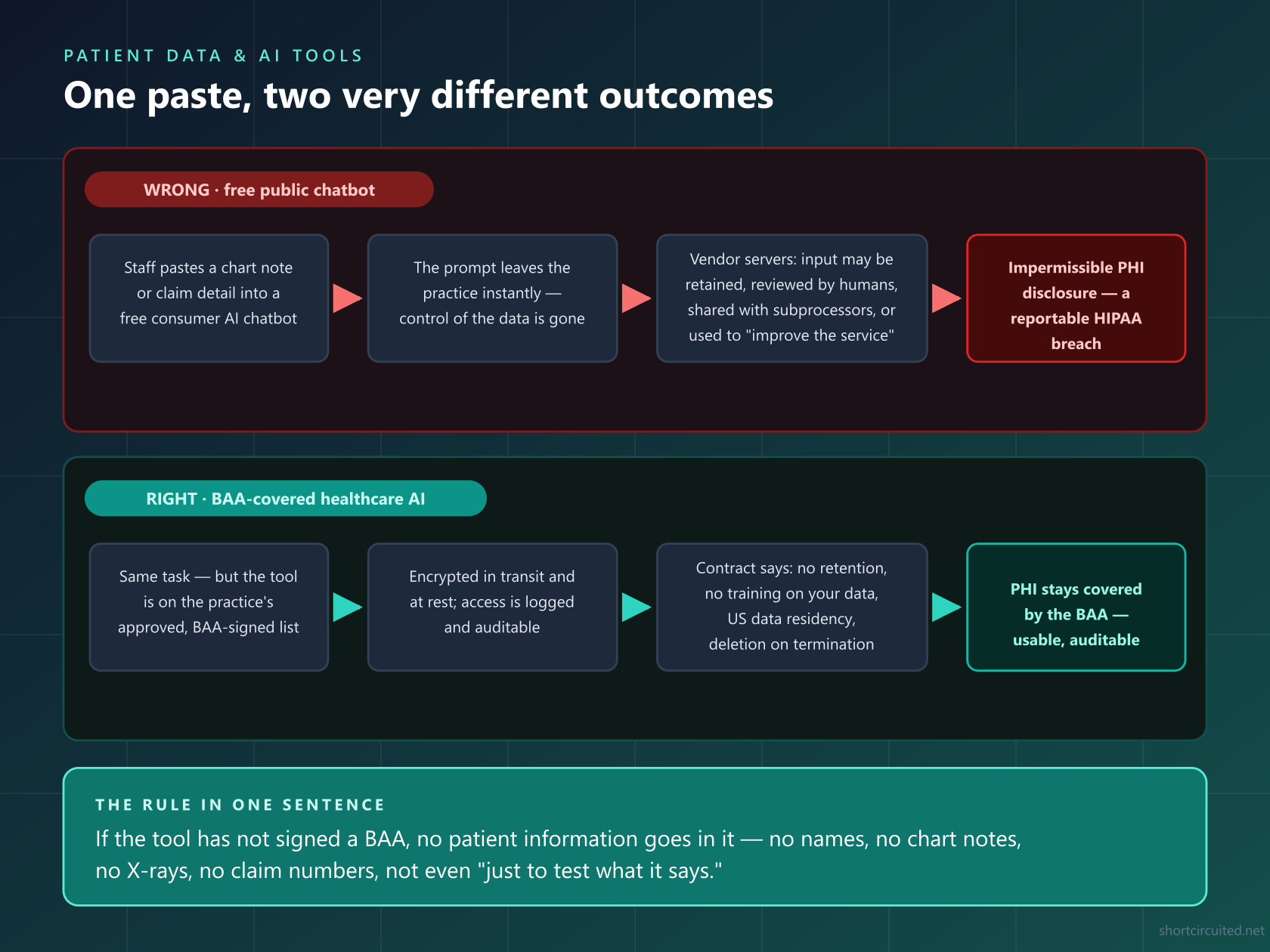
If the tool has not signed a Business Associate Agreement, no patient information goes into it. Not names, not chart notes, not X-rays, not claim numbers, not “just this one paragraph with the name removed-ish,” not even hypothetically. A BAA is the contract that makes a vendor legally responsible for safeguarding your PHI. Consumer AI products — the free chatbots, the browser extensions, the photo apps — do not have one with your practice, which is exactly why they are free.
Here is the same rule as a picture, because this is the version staff remember: the same task, one paste, two completely different outcomes depending on which tool receives it.
The Complete AI Safety Checklist: 10 Parts
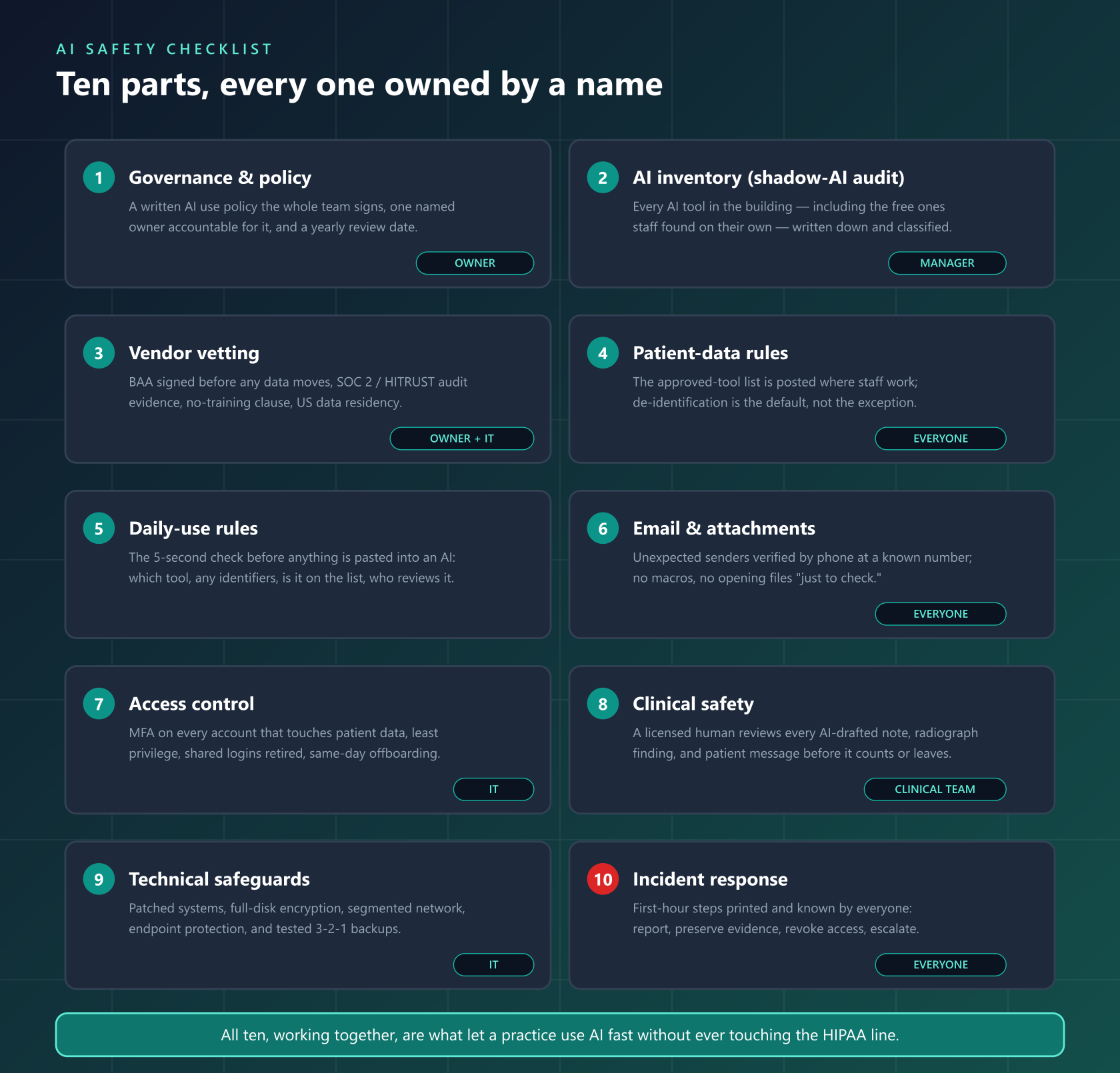
Ten sections, each with a natural owner. Print the map, assign a name to every part, and work through the checks below — the whole thing fits on one page per section.
1. Governance: Write the Rules Down
An unwritten AI policy is a rumor. The policy can be one page — what it must cover is fixed:
- Written AI use policy exists and every team member has signed it — front desk, assistants, hygienists, associates, billing, and the doctors themselves.
- One named AI owner. Usually the practice owner or office manager; the person who approves tools, fields reports, and answers “can I use this for…?”
- The approved-tool list is written, dated, and posted — see Part 4. If a tool is not on the list, the answer is no until the owner says otherwise.
- Consequences are stated and match your existing HIPAA sanction policy — the goal is fast self-reporting, not fear-driven silence.
- A yearly review date is on the calendar. AI terms change; last year’s approved tool can quietly change its data-retention policy.
- The policy covers personal devices and personal accounts — doing practice work in a personal AI account is the most common loophole.
2. Inventory Every AI Tool (Including the Ones You Don’t Know About)
“Shadow AI” — tools staff adopted on their own — is where breaches start, because nobody vetted what those tools do with input. You cannot police what you have not found:
- Walk the practice: ask each team member, one-on-one, what AI they use for work. Anonymous survey if needed — you want honesty, not confessions.
- Audit the practice management stack for AI features already inside it — charting suggestions, claim scrubbing, appointment-no-show prediction, patient-messaging AI. Built-in features need vendor vetting too.
- Check browsers: AI extensions, note-takers, and meeting-transcriber plugins on office machines, and any AI assistant enabled in the email client itself.
- Check meeting software: AI notetakers and bots invited into treatment-plan discussions, morning huddles, or vendor calls.
- Classify every finding: covered by a BAA / inside a vetted platform = allowed; not covered = remove or replace with an approved tool.
- Re-scan quarterly. New AI tools appear weekly; shadow AI regrows like weeds.
3. Vet Every AI Vendor Before Data Moves
Vendor vetting is where the BAA lives, and the BAA is the whole ballgame. For every AI tool that will touch patient information — directly or through your practice management software — get these answers in writing:
- Will they sign a BAA? A vendor who handles PHI and will not sign one has answered the vetting question for you.
- Where is the data stored and processed? US data residency is the comfortable default; foreign processing adds legal surface you do not want.
- Is your data used to train their models? You need a contractual “no” — not a settings toggle that ships on by default.
- What is retained, for how long, and can you force deletion at termination?
- Independent security audits: SOC 2 Type II or HITRUST reports available under NDA.
- Subprocessor list — who else touches the data — and breach notification commitments in hours or days, not “promptly.”
- Encryption in transit and at rest, and role-based access controls for their staff.
- For clinical AI: regulatory status. FDA clearance for its intended use as an assistive device (see Part 8 for the human-review rule that always applies).
Keep the due-diligence answers in a vendor folder — HIPAA auditors and cyber insurance applications both ask for them.
4. Patient-Data Protection Rules
This is the section staff interact with daily, so it needs to be concrete enough to act on without a lawyer:
- The approved-tool list is physical: taped at the front desk and in the back office, with the tool names, what each is approved for, and the date it was last verified.
- Default to de-identification. “A patient in her 40s in Brooklyn with the following clinical situation…” is fine anywhere; the chart with name, DOB, and MRN is not fine outside covered tools.
- Know the identifiers: names, all dates beyond year, phone, email, addresses, photos, X-rays, MRNs, insurance IDs, SSNs, and any unique code. Radiographs count even without a name — tooth patterns identify.
- Screenshots count. A screenshot of the schedule or the chart pasted into an AI tool is PHI, exactly like the text.
- Nothing with PHI goes to personal accounts — no “I’ll finish this at home in my own chatbot.”
- Free tiers are consumer products. If you are not paying for the healthcare configuration, assume there is no BAA — because there isn’t.
5. Daily-Use Rules for Staff: The 5-Second Check
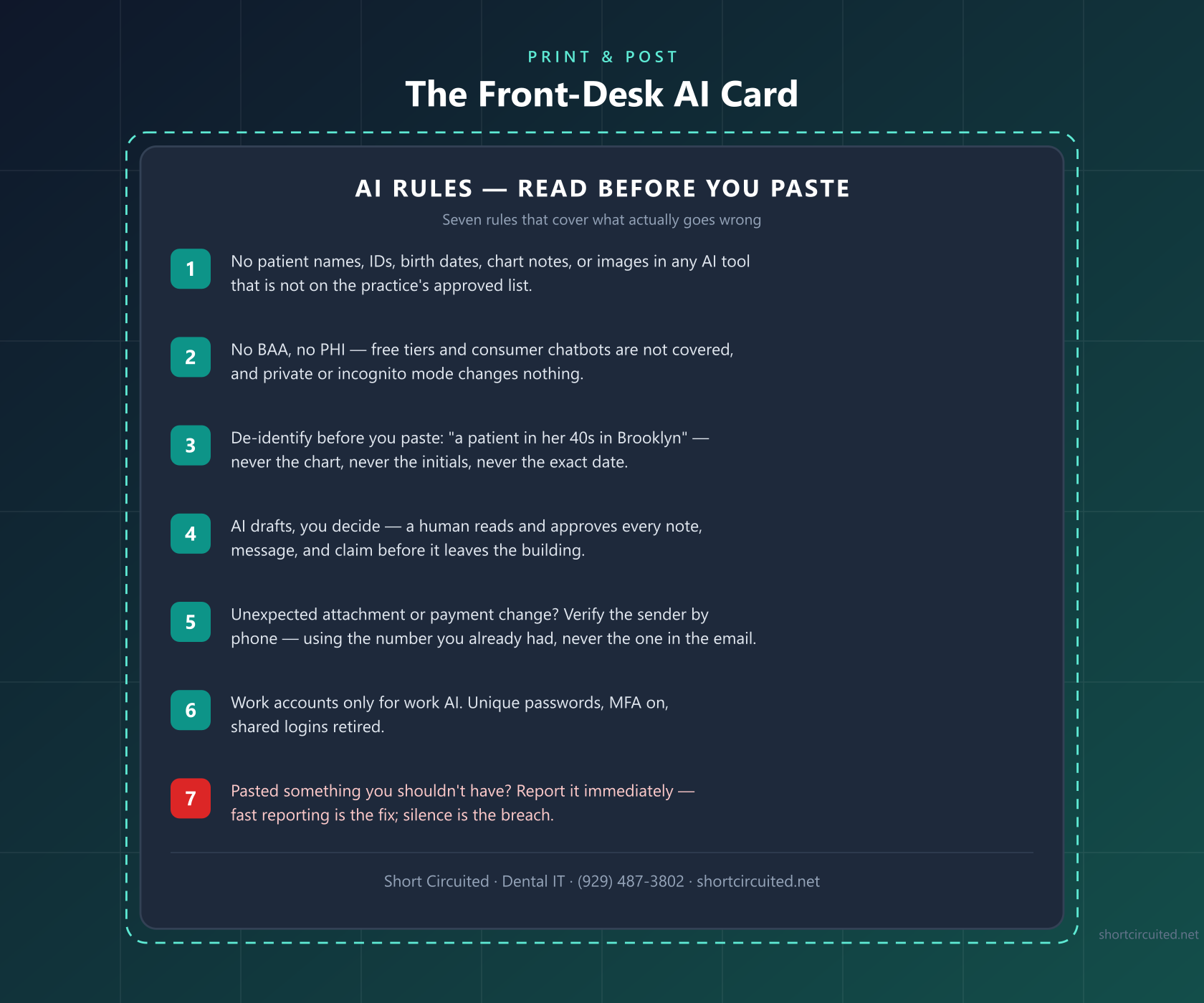
Before anything is pasted into an AI tool, the person pasting runs four questions: Which tool am I in? (approved list), is there any identifier in this text? (names, dates, images, MRNs), am I in a work account?, and who reviews the output before it counts? Five seconds, four questions, and it stops the overwhelming majority of AI privacy incidents.
The card below is the whole daily-use policy in printable form — tape it where the team actually works:
6. Email and Attachment Safety
AI did not invent phishing, but it industrialized the writing of it. A modern lure aimed at a dental office is grammatically perfect, references real industry artifacts (remittance advice, eligibility inquiries, supply invoices), and carries a payload attachment. Here is what one looks like under the microscope:
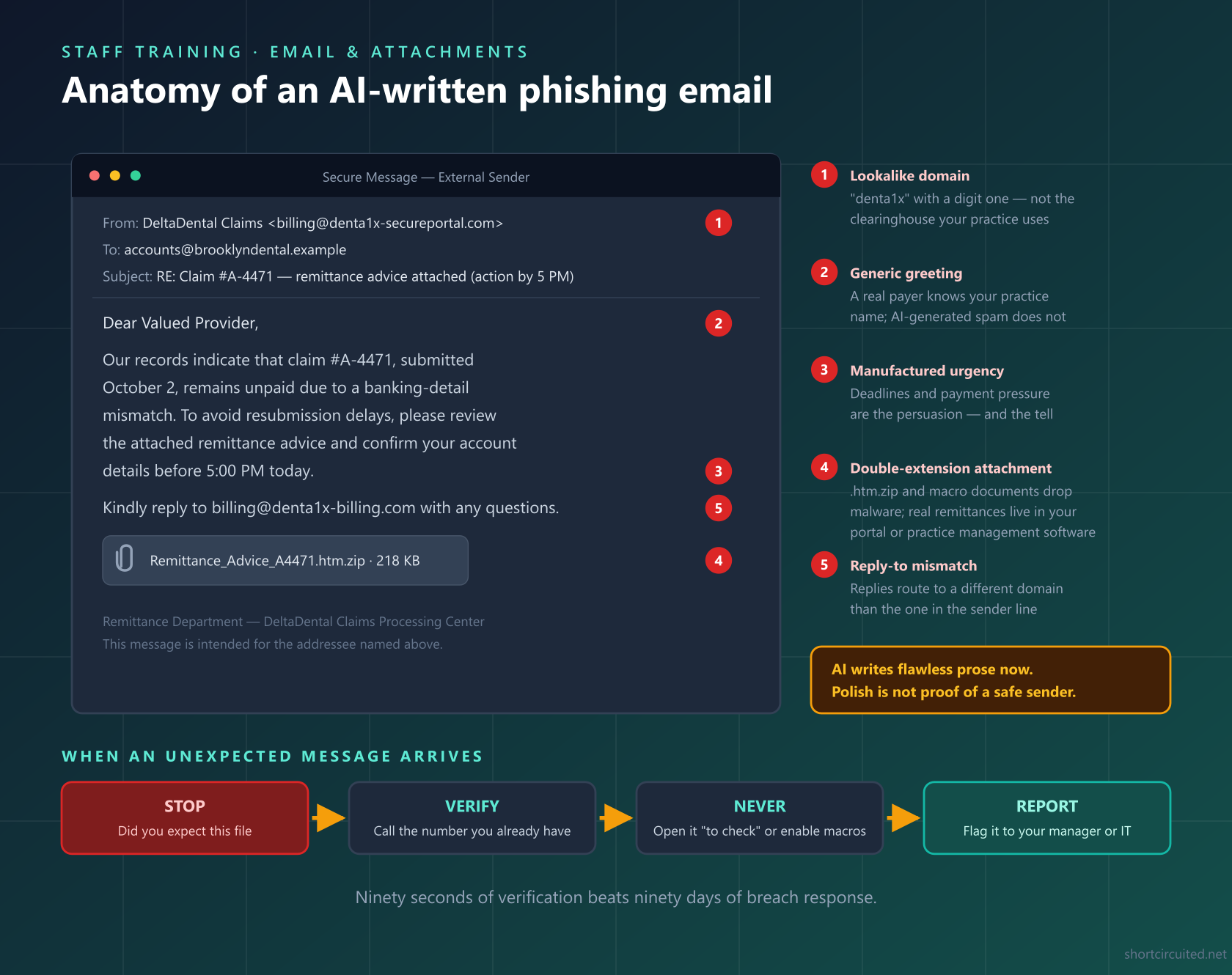
The attachment rules that go with that picture:
- Unexpected attachment = phone verification. Call the sender at the number you already have on file — never the number in the email — before opening anything.
- Treat these extensions as radioactive: .zip, .htm/.html, .iso, .img, and Office files that demand you “enable content” or “enable editing” to view them.
- Never open a suspect file “just to check.” That is the entire point of the lure. When in doubt, forward it to your IT company unopened.
- Payment-detail changes get a second channel, always. The “updated banking information” email is the classic business-email-compromise play against practices and suppliers alike.
- Verify voice requests too. AI voice cloning means a phone call “from the doctor” asking for a patient record or a wire can be fake; call back at the known number.
- Report and thank. Every reported phish gets acknowledged publicly; the alternative is staff deleting them silently and the one real attack landing.
7. Access Control and Accounts
AI tools widen your account surface; access discipline keeps it flat:
- MFA on every account that touches patient data — practice management, email, imaging, clearinghouse, and every approved AI tool. No exceptions for “it’s faster.”
- AI accounts are work accounts, created on practice email, owned by the practice, recoverable when staff leave.
- Least privilege: billing staff have billing AI access, clinical staff have clinical tools — nobody has everything.
- Shared logins retired. You cannot audit — or offboard — an account four people use.
- Password manager for the whole practice; unique passwords everywhere, so one leaked AI-site password opens exactly one door.
- Same-day offboarding: accounts disabled the day someone leaves, including AI tools and any browser extensions under their login.
- Quarterly access review: a named person compares active accounts against active staff.
8. Clinical Safety: AI Assists, Humans Decide
The clinical rule is one sentence — a licensed human reviews and approves everything AI produces before it counts — and it decomposes into:
- Radiograph AI findings are flags, not diagnoses. The dentist reviews every flagged area and signs the interpretation. FDA clearance for these tools is as assistive devices; the diagnostician is still you.
- AI-drafted clinical notes are read and corrected by the provider before filing — hallucinated findings in a chart are a clinical and legal record problem.
- AI-written patient communications get human approval before sending, for tone and accuracy both.
- Claim codes are chosen by a human. AI suggestions for codes and narratives are drafting help; submitting AI-selected codes unread is how billing audits happen.
- Document AI use where it matters: if a finding originated from an assistive tool, the chart can say so. Transparency is cheaper than discovery.
- Never auto-send. No approved AI tool publishes to patients, payers, or the chart without a human pressing the button.
9. Technical Safeguards That Do the Heavy Lifting
The human rules above fail gracefully when the technical floor is solid. This is the IT section — and it is the section we live in:
- Patching discipline: Windows, practice management, imaging software, and firmware updated on a monthly schedule — ransomware and data theft overwhelmingly enter through unpatched, internet-facing software.
- Full-disk encryption on every workstation, laptop, and server; a stolen operatory PC with an encrypted drive is an incident, not a breach report.
- Endpoint protection with rollback on every machine that can open an attachment.
- Email filtering with attachment sandboxing, plus DNS filtering on the office network to kill malicious links at click time.
- Network segmentation: imaging sensors, operatory workstations, and the server on VLANs separated from guest Wi-Fi and the front-desk IoT zoo.
- 3-2-1 backups: three copies, two media, one off-site and ideally immutable — with a restore test every quarter. An untested backup is a hope, not a backup; see our backup and disaster recovery guide.
- Block unapproved AI domains on the office network if policy says so — technical enforcement of the approved list beats willpower.
- Secure the Wi-Fi patients see: segmented, WPA2/WPA3, and a password that is not on a sticker at the front desk.
10. Incident Response: The First Hour
Something will eventually go wrong — a paste into the wrong tool, an opened attachment, a lost laptop. The difference between an incident and a disaster is what happens in the first hour, so the steps live on paper, not in someone’s head:
- Report without fear: every staff member knows who to tell (the AI owner, the office manager, and your IT company’s number), and the policy says plainly that fast reporting is never punished.
- Preserve evidence: for an email incident, don’t delete the message; for a paste, save what was pasted and the response; for malware, disconnect from the network but leave the machine on.
- Contain: revoke or reset affected credentials, disable the compromised account, pull the network cable on an encrypting machine.
- Escalate to the right people: your IT company for forensics and containment, your compliance advisor for the HIPAA analysis, and — if ransomware or theft is involved — counsel and possibly law enforcement.
- Run the four-factor risk assessment with your compliance advisor for any suspected PHI disclosure. HIPAA’s notification clock generally runs 60 days from discovery — document the date you discovered it.
- After-action review: every incident ends with one written question — which checklist item would have prevented this? Then fix that item.
The Maintenance Cadence
A checklist run once is a project; a checklist on a schedule is a program. Here is the calendar version:
| When | What | Owner |
|---|---|---|
| Daily | Backup completion verified (automated alert to a human), AI work happens only in approved tools, any suspicious message reported | Everyone / IT |
| Weekly | Review reported phishes, check for unknown AI sign-ups or new browser extensions, confirm patch status | AI owner / IT |
| Monthly | Patch cycle on servers and workstations, offboarding check, shadow-AI spot check, review AI tool usage logs where available | IT / Manager |
| Quarterly | Staff AI-safety refresher, phishing simulation, backup restore test, access review, re-verify each approved vendor’s BAA and terms | AI owner / IT |
| Annually | Full AI policy review and re-sign, HIPAA risk analysis refresh (see our HIPAA risk assessment guide), incident-response tabletop exercise, insurance coverage check for AI and cyber | Owner / Compliance |
A Note for Medical Offices
Everything above applies to medical and veterinary practices unchanged: the HIPAA Privacy and Security Rules, BAAs, the identifier list, phishing mechanics, MFA, backups, and breach notification are identical. Substitute “practice management software” for your EHR, “payers” for dental plans, and the ten parts need no other edits. The AI risk surface is profession-agnostic — the same chatbot, the same paste, the same breach.
Roll It Out in 30 Days
- Week 1 — Policy and inventory. Name the AI owner, draft the one-page policy, run the shadow-AI audit from Part 2, and get signatures.
- Week 2 — Approved list. Vet current tools with Part 3’s questions, sign BAAs with whoever qualifies, cut whoever doesn’t, and post the list.
- Week 3 — Train. One 30-minute staff meeting: the one rule, the front-desk card, the phishing anatomy picture, and the first-hour steps. Everyone leaves able to name the two people they report to.
- Week 4 — Technical floor. MFA gaps closed, email filtering and attachment sandboxing verified, segmentation and backup-restore checked, first phishing simulation sent.
At the end of the month you have a practice that uses AI wherever it genuinely helps and cannot be breached by a paste, a pretty email, or a shared password. That is the whole game.
Frequently Asked Questions
Is ChatGPT HIPAA compliant for dental offices?
The free consumer chatbot is not. OpenAI offers HIPAA coverage only through its enterprise-tier offering with a signed Business Associate Agreement — and only when the workspace is configured for it. The same is true of Google’s and Microsoft’s consumer AI assistants. The version your staff type into for free, on either a work or personal account, is not covered by any BAA, so pasting patient information into it is an impermissible disclosure under HIPAA.
Can front-desk staff use AI to draft patient emails and recall messages?
Yes — with three conditions. The tool must be on the practice’s approved list (BAA signed if any patient information touches it), the input must be de-identified unless the tool is fully covered, and a human must read and approve every message before it is sent. AI drafting with human sign-off is a legitimate productivity win; unsupervised AI sending messages on its own is not.
What exactly counts as PHI when using an AI tool?
Any of the eighteen HIPAA identifiers attached to health information: names, geographic subdivisions smaller than a state, dates (birth, admission, discharge, service) beyond year, phone and fax numbers, email addresses, Social Security and medical record numbers, health plan beneficiary numbers, account numbers, license and certificate numbers, vehicle identifiers, device identifiers, URLs, IP addresses, biometric identifiers, full-face photos, and any other unique identifying number or code. An X-ray alone can be PHI even without a name — tooth patterns are identifying.
Is de-identified information safe to paste into any AI?
Properly de-identified data is no longer PHI, so HIPAA does not restrict it. The catch is that proper de-identification is harder than it looks: a note saying “a 34-year-old female in zip 11215 with the rare ameloblastoma resected last Tuesday” re-identifies easily, because the combination itself is unique. If your team cannot apply the Safe Harbor list reliably, the safer rule is the one on the front-desk card: approved tools only, de-identified or not.
What should we do if a staff member pasted patient data into a public AI chatbot?
Report it immediately — to the privacy officer, the owner, or your IT company. Then treat it as a potential breach: preserve what was pasted and any responses, document the date, the account, and the data involved, and run a four-factor risk assessment with your compliance advisor. HIPAA generally requires notification within 60 days of discovering an impermissible disclosure, and an honest, documented, fast response is viewed far more kindly than a quiet one that surfaces later.
Are AI dental radiograph analysis tools safe to use?
Several radiograph-analysis products carry FDA clearance as assistive devices, and they are genuinely useful second readers. Two rules keep you safe: vendor due diligence first (BAA, clearance status, security posture), and the dentist remains the diagnostician — AI findings are flags to review, never a diagnosis that goes into the chart unchecked. The same human-signs-off rule applies to AI charting and AI-drafted clinical notes.
Does turning off chat history or using private mode make an AI tool HIPAA compliant?
No. Retention settings, incognito windows, and “do not train on my data” toggles are product features, not legal agreements. HIPAA compliance for a vendor relationship comes from a signed Business Associate Agreement that obligates the vendor to safeguard PHI — a setting you can flip back does not obligate anyone to anything.
How often should dental office staff be trained on AI safety?
At onboarding for every new hire, with a short refresher at least quarterly. Pair the refresher with a phishing simulation every quarter, because email is where staff actually meet the attacker. Re-train immediately whenever the approved-tool list changes or an incident near-miss happens — a real example from your own office teaches more than any generic module.
Want the AI Part Handled For You?
We support dental and medical offices across NYC with the unglamorous parts of this checklist — dental IT management, HIPAA compliance workups, cybersecurity hardening, server and network design, tested backups, and ongoing care through monthly plans. We’ll run the vendor vetting, close the MFA gaps, and train your team — then keep the checklist current as the AI landscape shifts under it.
- Call (929) 487-3802 or send us a message
- Email dental@shortcircuited.net
- Read next: AI in the dental office: what it’s actually good for, why hackers target dental offices, and how to protect your practice from malware