Cyber Security for Dental & Medical Offices
Malware removal, ransomware response and router hardening for NYC healthcare practices — layered defenses that protect patient data and keep your chairs running.
Healthcare runs on data that criminals price higher than almost anything else they steal. A dental or medical office holds all of it in one place: names, dates of birth, Social Security numbers, insurance IDs, payment cards and complete health histories. That makes every practice — solo or multi-location — a target, and it's why healthcare has posted the highest average breach cost of any industry year after year.
The threats are not abstract. It's a phishing email at the front desk pretending to be an insurance payment. Ransomware that encrypts your Dentrix, Eaglesoft, Open Dental or EHR server overnight. Malware quietly harvesting logins for months. A consumer router still sitting on its default password with remote access open to the whole internet.
We're a Brooklyn-based IT company that secures dental and medical offices across NYC — malware removal, ransomware response, router and firewall hardening — and we document all of it so the work counts toward your HIPAA Security Risk Analysis.
What you get
- ✓Same-day emergency malware removal and ransomware response, on-site across NYC
- ✓Managed EDR / next-gen antivirus on every workstation and server
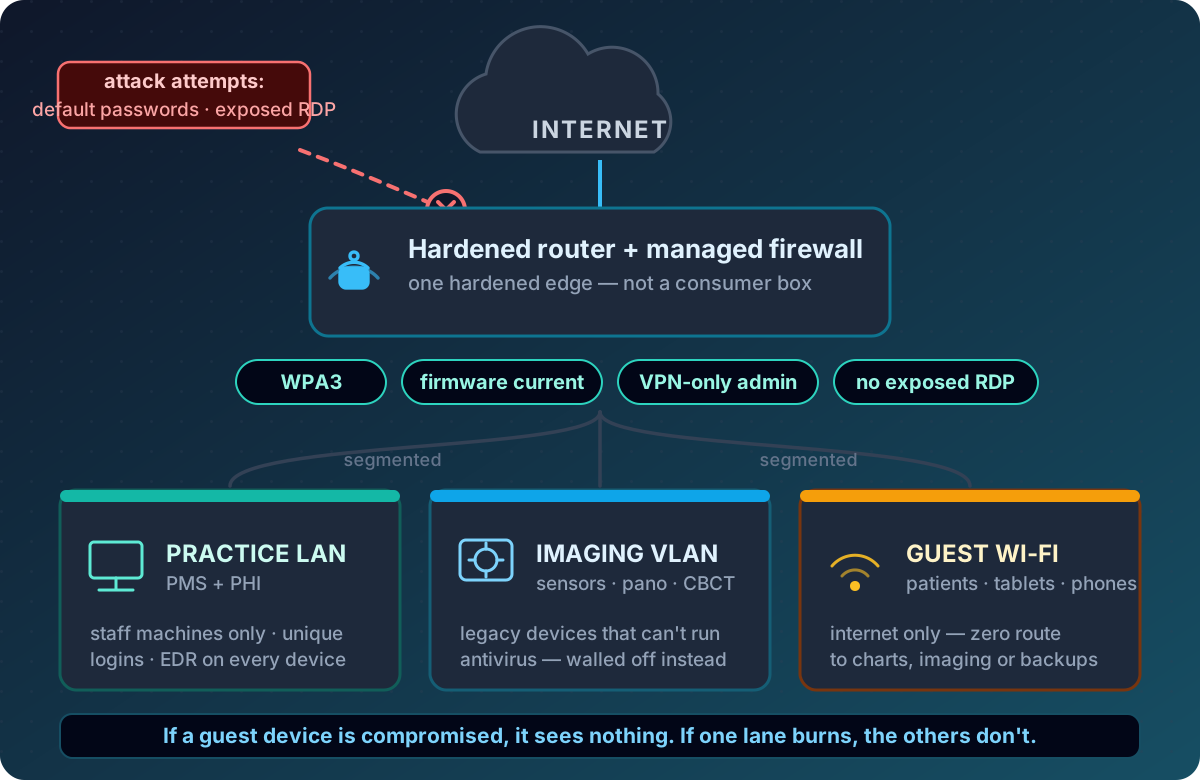
- ✓Router and firewall hardening — WPA3, VPN-only admin, zero exposed remote access
- ✓Network segmentation: imaging devices, guest Wi-Fi and PHI walled off from each other
- ✓Email phishing filtering and dental-specific staff security training
- ✓Patch management so no operatory machine quietly falls years behind
- ✓Continuous monitoring with alerting — we usually see trouble before you do
- ✓Documentation packaged as evidence for your HIPAA Security Risk Analysis
Why dental and medical offices are prime targets
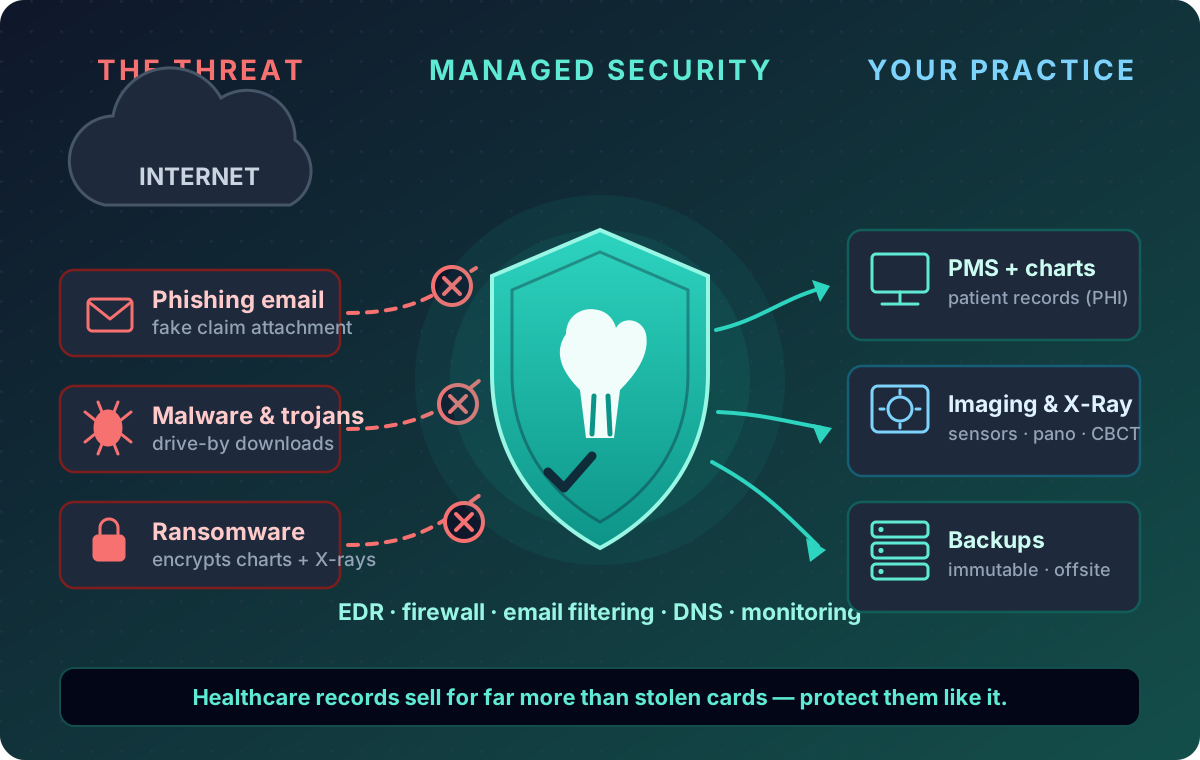
A stolen credit card can be cancelled with one phone call. A stolen medical identity can't be — it lets someone bill insurance, fill prescriptions and open fraud in your patient's name for months before anyone notices. On criminal markets, a complete patient record commands many times the price of a card number for exactly that reason. Your charts are the product.
Ransomware crews like healthcare for a second reason: care can't pause. A retailer hit on Friday can limp through the weekend; a practice with a full Monday schedule and no chart access is under enormous pressure to pay and pay fast. Attackers know the downtime math better than most practice owners do.
And the “we're too small to bother with” assumption is exactly backwards. Nobody hand-picks a small practice — automated scans map the entire internet looking for exposed remote access and unpatched routers, and hit whoever answers. A flat network, a shared front-desk login, an imaging PC that “can't be upgraded”: that's who gets hit, at every size.
There's also the compliance dimension. The HIPAA Security Rule requires you to assess and implement safeguards like these — encryption, access control, audit controls, protection from malicious software. A breach without them means notification obligations, potential OCR penalties and a very public entry on HHS's breach portal. Our HIPAA compliance services handle the paperwork side; this page is the technical side that makes it real.
Malware removal for dental and medical offices
How it gets in:phishing attachments dressed up as insurance payments, lab results or payroll changes; compromised websites and malicious ads; USB drives; remote-access tools with reused passwords; and unpatched software on machines nobody watches. Front-desk and billing workstations are the usual landing zone because that's where email happens.
What it looks like: workstations that suddenly crawl, popups and browser redirects, toolbars nobody installed, your PMS timing out or crashing for no reason, security software that has silently disabled itself — or files renaming themselves and a ransom note, at which point this becomes an emergency (call (929) 487-3802, and see the ransomware section below).
How we remove it: we isolate the machine from the network, image it so nothing can be lost, then clean with multiple scan engines plus manual removal of persistence — one scanner and a shrug is not a process. We find the root cause (which email, which credential, which open port), and before the machine goes back into an operatory we re-test the practice management software andimaging: sensor drivers, bridges and X-ray paths. A clean machine that can't take an X-ray is not a working machine. In-place cleaning whenever possible; a surgical rebuild that preserves your data when not.
Ransomware response and alleviation
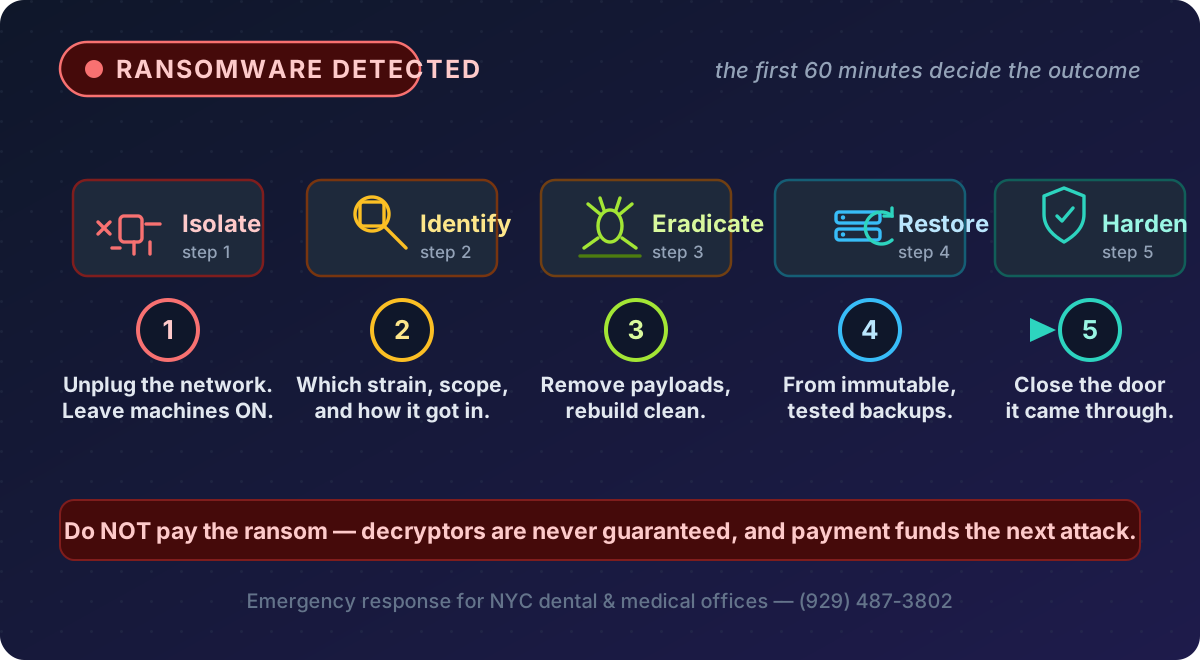
If it's happening right now: disconnect machines from the network — unplug the cable, turn off Wi-Fi — but leave them powered on. Memory can hold encryption keys and evidence. Don't reboot repeatedly, don't delete anything, don't pay anything, and don't connect backup drives “to check.” Then call (929) 487-3802. We triage active infections same-day across the five boroughs.
Our response runs contain → identify → eradicate → restore → harden. Containment stops the spread. Identification matters because ransomware strains behave differently — some have public decryptors or known flaws — and because you need to know which door it used. Eradication removes the payload. Restoration brings your PMS, imaging and documents back from clean, pre-incident copies — which only works if you have immutable, tested backups ransomware can't touch, and that page covers how we build those. Then hardening closes the entry point so round two never happens.
On paying: we advise against it, consistent with FBI guidance. Payment guarantees nothing — decryptors are often broken or incomplete — it marks you as a payer for the next crew, and some extortion groups are under OFAC sanctions, which turns payment into its own legal problem. With tested backups, most practices never have to make that choice.
Alleviation — shrinking the blast radius:the goal is that even a successful attack is a bad afternoon instead of a closed week. EDR that detects encryption behavior and rolls a machine back automatically. Network segmentation so ransomware on a front-desk PC can't hop to the server or imaging VLAN. MFA so stolen credentials don't work. Immutable offsite backups it can't encrypt or delete. Prepared practices recover in hours to days; unprepared ones lose a week of chairs or more.
Router and firewall hardening
The cheapest computer in most practices is the one guarding everything: a consumer router bought years ago, still on its default password, admin page reachable from the internet, firmware never updated once. Every device in the office — charts, X-rays, sensors, the server — sits behind it. It's the front door, and for a shocking number of practices it's unlocked.
Hardening that edge is concrete, checklist work, and we do all of it:
- Factory-default credentials replaced; WPS disabled
- Firmware kept current on a schedule, not “when it breaks”
- WPA3 (or WPA2 where devices demand it) with real passphrases
- Admin interface unreachable from the internet — management over VPN only
- Remote desktop and other exposed ports closed; legitimate remote access via VPN
- DNS-level filtering blocking known malicious domains on every device
- Monitoring that alerts on outages, tampering or unknown devices
Just as important is segmentation: a hardened practice LAN for staff machines and PHI, a separate VLAN for imaging and sensor equipment that can't run antivirus, and an isolated guest Wi-Fi for patients and personal phones. A compromised patient laptop then sees nothing. If one lane burns, the other two keep working. If you're building out or replacing a network, we design this in from the first cable pull — see our network and server setup page.
Defense in depth: the layers around the firewall
No single control stops everything, so we stack them so each covers the others' blind spots:
- EDR on every endpoint — behavior-based detection and rollback, not just signature scanning, on workstations and servers
- Email security — phishing and attachment filtering, SPF/DKIM/DMARC so nobody can impersonate your domain, external-sender banners
- Multi-factor authentication on the PMS or EHR, Microsoft 365, imaging software, vendor portals and the router itself
- Patch management — Windows, Office, the runtimes your imaging software depends on, server and switch firmware
- Least privilege— unique logins for every staff member (no shared “frontdesk” accounts) and access only to what each role needs
- Staff training — short, healthcare-specific phishing and social engineering drills, because email is the #1 way in
- Dark-web monitoring— alerts when practice credentials show up in a breach dump, so passwords get changed before they're used
All of it is monitored and reviewed with you quarterly, and all of it feeds the documentation your HIPAA risk analysis expects.
Medical offices: same threat model, same playbook
This page lives in our dental section because that's most of our healthcare work, but the threat model is identical for medical offices: family medicine, internal medicine, pediatrics, dermatology, physical therapy, chiropractic, urgent care and specialists. You hold ePHI, you fall under the same HIPAA Security Rule, and the same phishing emails, ransomware crews and exposed remote access are aimed at you — whether you run Dentrix or a full EHR with e-prescribing.
We're not a hospital security operations center, and a 1–20 provider office shouldn't pay for one. We deliver right-sized healthcare security: a hardened edge, segmented network, EDR everywhere, MFA, tested backups and trained staff.
How a security engagement works
- Assessment (week one). We inventory every device, map the network, check backup and patch status, and hand you a plain-English roadmap ranked by actual risk — not a 60-page template.
- Remediation. Router and firewall hardening, EDR deployment, email filtering, segmentation, MFA, and backup fixes — scheduled after hours so operatories keep running.
- Managed monitoring. Alerting, patching, quarterly reviews and unlimited support under a flat monthly plan — see monthly IT plans.
- Documentation. Everything above is written up as evidence for your Security Risk Analysis, alongside our HIPAA compliance program.
If you'd rather find out where you stand before committing to anything, the assessment is a standalone deliverable — and the honest findings are yours to keep whichever way you go.
Frequently asked questions
▸How do dental and medical offices actually get breached?
Almost always one of four doors: a phishing email that steals a password or drops malware; exposed remote access behind a weak or reused password; unpatched softwareon a workstation, server or router; or an accident like a personal laptop on the practice network. None of it requires your practice to be “interesting” — attackers scan the whole internet for open doors. You're targeted for what you hold, not who you are.
▸Something looks infected right now — what do we do in the next ten minutes?
Disconnect, don't delete, and call. Unplug the network cable or kill Wi-Fi on affected machines — but leave them powered on(memory can hold encryption keys and evidence). Don't reboot repeatedly, don't delete files, don't attach backup drives, don't pay anything. Then call (929) 487-3802 — we triage active infections same-day across NYC.
▸Should our practice pay the ransom?
No — consistent with FBI guidance. Payment guarantees nothing, decryptors are often broken, paying marks you as a payer for the next crew, and some extortion groups are under OFAC sanctions, which creates its own legal exposure. With tested, immutable backups, paying stops being a decision you face. That's the position we build you into.
▸Can you remove malware without wiping our patient data?
Usually, yes. We image the machine first so nothing can be lost either way, then clean in place with multiple engines plus manual removal of persistence. If a rebuild is truly needed, your data comes back from that image or your backups — not from scratch. And before any machine returns to an operatory, we re-test the PMS and imaging stack end to end.
▸What does router hardening actually involve?
Making the device at your edge impossible to walk through: default passwords replaced, firmware current, WPS off, WPA3 with a real passphrase, admin reachable only over VPN, remote-access ports closed, DNS filtering, and monitoring. Plus segmentation— staff, imaging and guest traffic on isolated networks, so one compromised device can't reach everything else.
▸Isn't the antivirus that came with our computers enough?
No. Signature-based antivirus only catches known threats, and attackers test against the popular scanners before deploying. We deploy EDR, which watches behavior — a document that suddenly starts encrypting files gets stopped whether or not anyone has seen that variant, and rolled back automatically. Antivirus is a seatbelt; a healthcare office needs the seatbelt, the airbag, and someone watching the road.
▸Do you work with medical offices too, or only dental?
Both. Same PHI, same HIPAA Security Rule, same attackers. Whether you run Dentrix or a full EHR, the work is identical: hardened edge, segmentation, EDR, MFA, tested backups, trained staff. For a 1–20 provider office, that's exactly our size.
▸How much does a security incident actually cost a small practice?
More than preventing it would have — almost every time. Downtime (a dark practice produces no production), notification and credit monitoring, forensic and legal help, and OCR penalties that scale sharply when safeguards were skipped. Then the quiet cost: patients who learn their charts were exposed tend to rehome. A prepared practice recovers in hours to days; an unprepared one can lose a week of chairs.
Ready to stop fighting your tech?
We work with dental practices across NY. Most quotes in under an hour.