


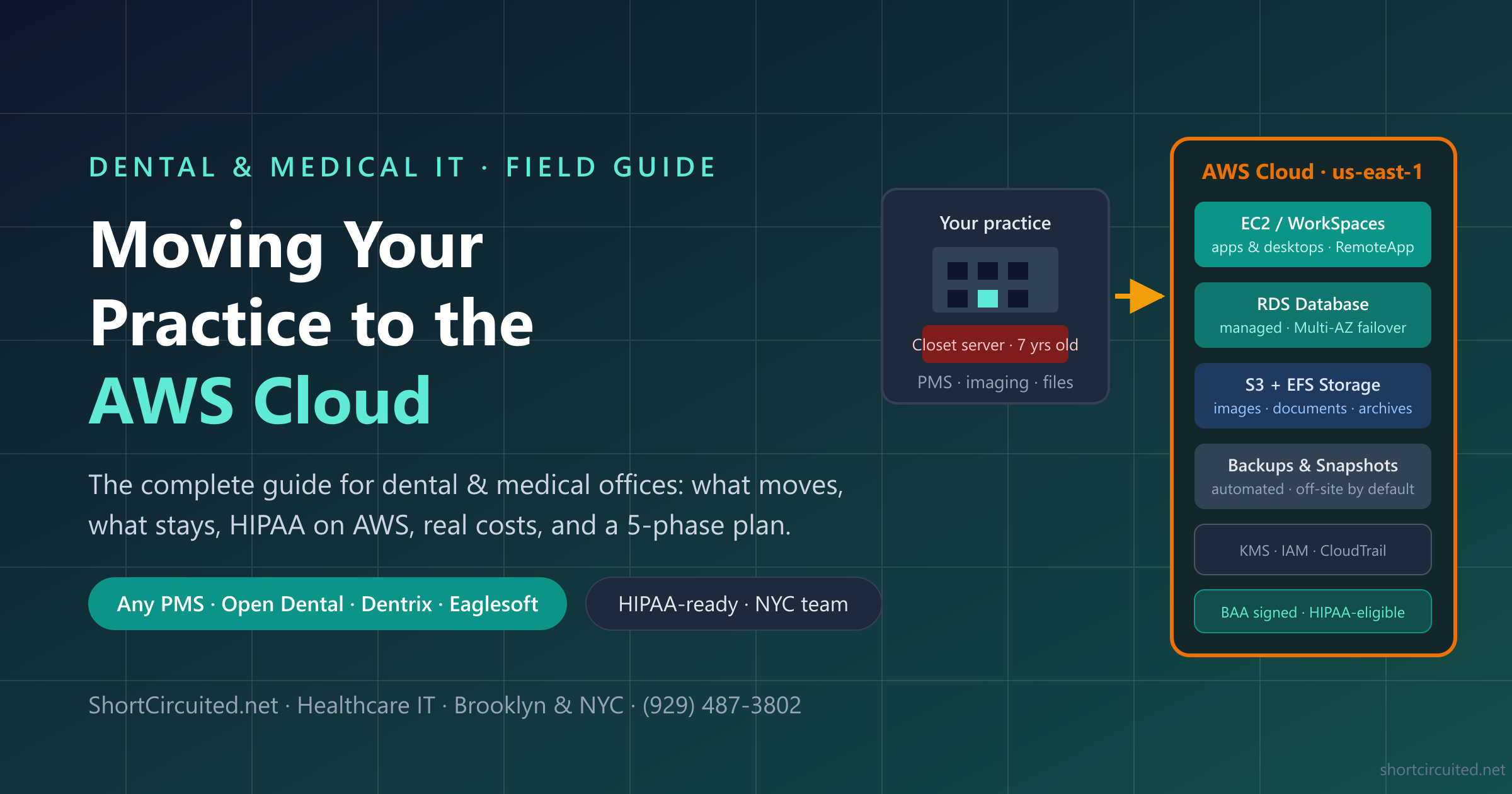
Moving Your Dental or Medical Practice to the Cloud with AWS
Somewhere in your office is a server — or a “server” that is really a desktop PC in a closet — holding your entire practice: the schedule, the chart, the ledger, every X-ray you have ever taken. When it dies, the office stops. When it gets encrypted by ransomware, the office stops for days. And every five years or so, you buy another one.
Moving that workload to Amazon Web Services is how a practice ends the closet-server era: the database gets automatic failover, backups stop depending on a USB drive, doctors work from anywhere at full speed, and opening a second location stops being an IT project. This guide is the practice-level playbook we use with dental and small medical offices across New York City — what actually moves, what stays, what HIPAA requires, what it costs, and how the migration runs week by week.
Disclosure: Short Circuited is an independent healthcare IT company — we are not affiliated with Amazon Web Services or any practice-management vendor. AWS prices here are approximate (October 2026, us-east-1, on-demand); model your own build in the AWS Pricing Calculator.
Why Practices Move: The Signs You Already Know
Nobody wakes up wanting “cloud.” Practices call us because of symptoms, and they are almost always on this list:
- The server is old. Out of warranty, running out of space, and nobody wants to sign the quote for the next one.
- A second location or an acquisition. Tying two offices to one closet over a VPN is where on-premises networking goes to die.
- Owners want to work from home — evenings on the schedule, chart reviews, production reports — without a remote session that takes 30 seconds per click.
- A scare. Ransomware down the block, a flood, a burglary, or the discovery that the “backup” drive has been failed for six months. See why hackers target dental offices — healthcare is the most-attacked industry there is.
- An audit or a new associate demanding real security answers, not assurances.
If two or more of those are true for you, the rest of this guide is your decision framework. If none are, bookmark it for the day the server warranty lapses.
First, Decide What “Moving to the Cloud” Even Means: Three Paths
“The cloud” gets used for three completely different arrangements, and confusing them is how practices end up with the wrong one. Before any technical decision, pick your path:
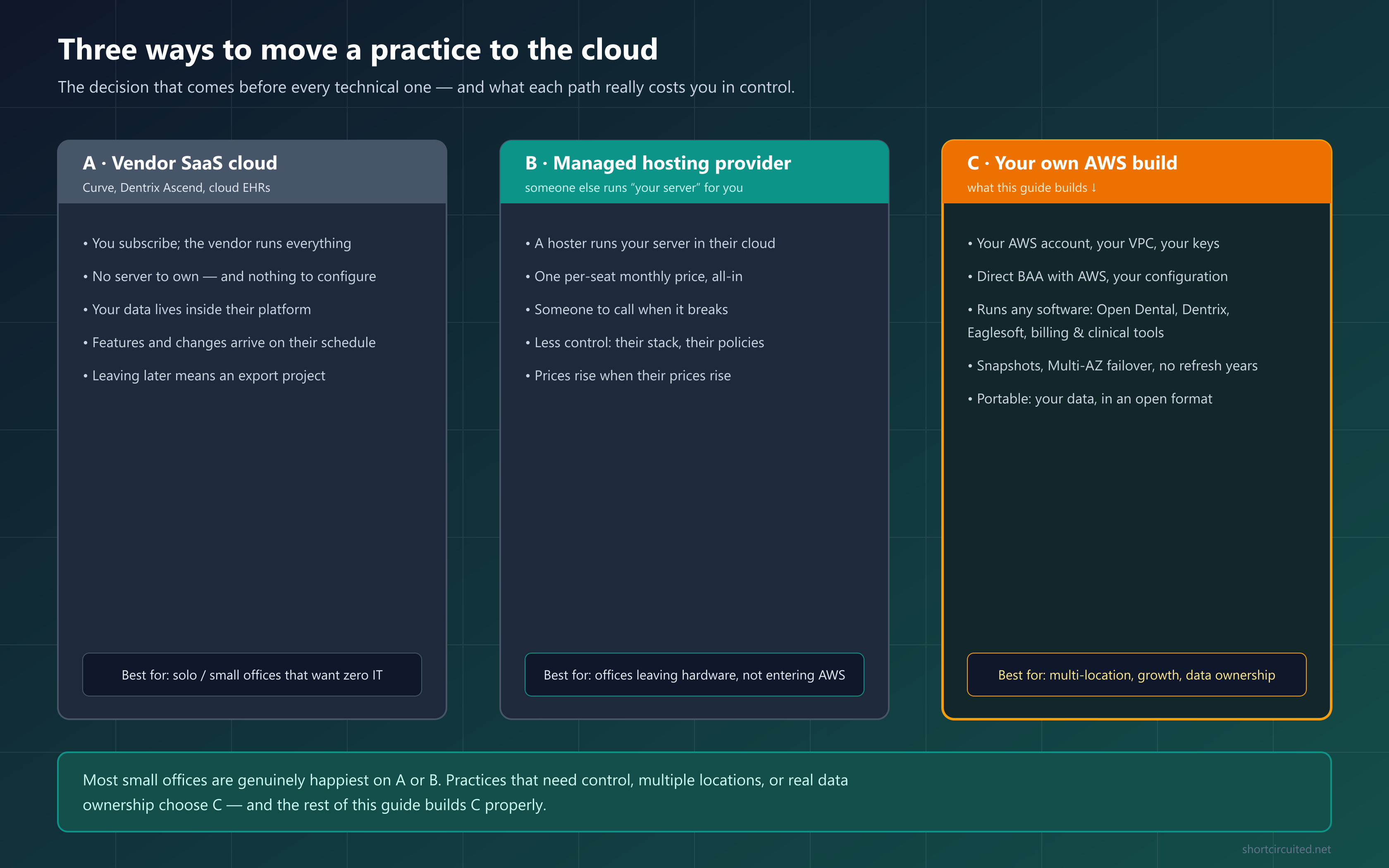
| Path | What it is | You give up / you get | Best for |
|---|---|---|---|
| A · Vendor SaaS Curve, Dentrix Ascend, most cloud EHRs | You subscribe; the vendor runs the software and the infrastructure | Give up: infrastructure control, your current software, easy exit. Get: zero servers to own, predictable per-user pricing | Solo and small offices that want out of IT entirely and like the software |
| B · Managed host | A hosting company runs “your server” in their cloud; you pay per seat | Give up: the stack is theirs, prices are theirs. Get: someone to call, no hardware, all-in monthly price | Offices leaving hardware but not ready to run their own cloud |
| C · Your own AWS (this guide) | Your AWS account runs your current PMS/EHR on a terminal server with a managed database, under your own BAA | Give up: a monthly platform bill and the need for real IT management. Get: full control, any software, portable data, direct AWS pricing | Multi-location, growth plans, data ownership, cost control at 4+ seats |
There is no universally right answer — there is a right answer per practice. We run offices on all three. But if you have multiple locations, or you want to keep the software you already own, or the vendor per-user quotes make your accountant flinch, path C is the one that pays off, and the rest of this guide is about doing it properly.
Why AWS Specifically for a Healthcare Practice
AWS is not the only cloud, but for small healthcare practices it is the one with the fewest asterisks:
- A BAA you can actually sign. AWS offers a self-service Business Associate Agreement through AWS Artifact — free, click-through, and covering a long list of HIPAA-eligible services. You are not negotiating with a sales team to get PHI covered.
- It runs anything. Your practice software does not have to be “cloud-native.” Open Dental, Dentrix, Eaglesoft, billing engines, dictation tools — if it runs on Windows, it runs on AWS. That is the difference between migrating your practice and replacing it.
- Close to New York. The us-east-1 region (N. Virginia) is the nearest and cheapest AWS region for NYC-area offices — single-digit milliseconds from the five boroughs, so remote sessions feel local.
- Disaster recovery is built in. Managed databases with automatic standby failover, point-in-time snapshots, cross-region backup copies — the things a closet server physically cannot offer.
- No refresh cycle, honest scaling. Hardware becomes AWS’s problem; you resize with a click and commit to 1- or 3-year savings plans (30–40% off) only once the build is stable.
- Exit is real. It is your account, your data, in open formats. Moving to another provider — or back on-premises — is a data copy, not a negotiation with a vendor who owns your chart.
What Moves to the Cloud — and What Stays in the Office
The single most useful thing to understand before you plan: a cloud migration is hybrid by design. Compute, storage, and backup move. Capture stays at the chair.
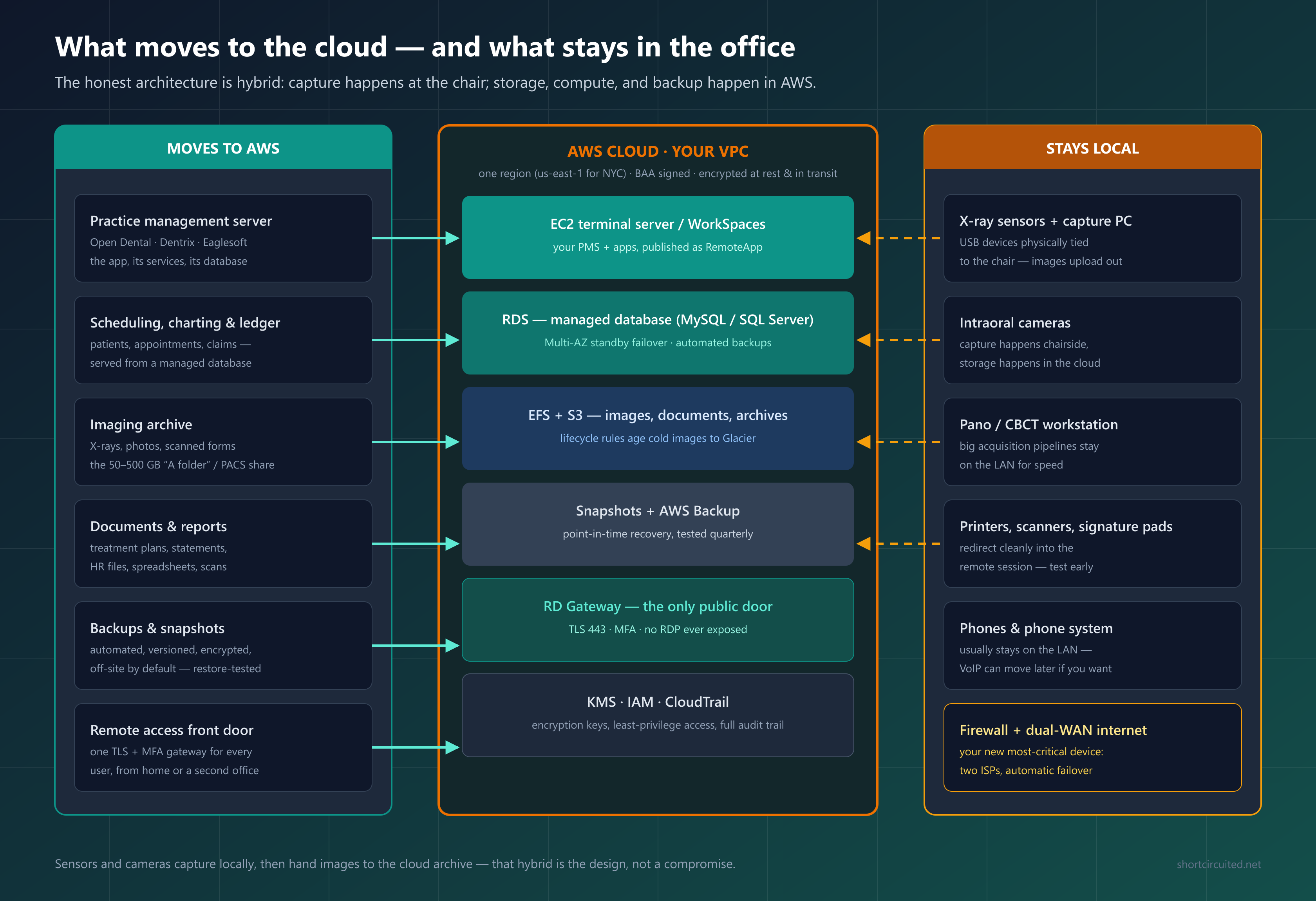
| Moves to AWS | Stays local |
|---|---|
| The practice-management server and its database (scheduling, charting, ledger, claims) | X-ray sensors and the capture PC they are physically wired to |
| The imaging archive — X-rays, photos, scanned forms (the 50–500 GB share) | Intraoral cameras, panos, and CBCT acquisition workstations |
| Documents, reports, treatment plans, HR files | Printers, card scanners, signature pads (they redirect into the remote session) |
| Backups and snapshots — automated, versioned, off-site by default | Your phone system (usually — VoIP can move later if you want) |
| The remote-access front door — one TLS + MFA gateway for every user | The firewall and dual-WAN internet — your new most-critical device |
Dental vs. Medical: Same Cloud, Different Cargo
We support both, and the infrastructure is identical — a terminal server, a managed database, cloud storage, an MFA gateway. What changes is what rides on it:
| Dental practice | Medical practice | |
|---|---|---|
| Core system | PMS — Open Dental, Dentrix, Eaglesoft; often on-premises on MySQL or SQL Server | EHR — athenahealth, eClinicalWorks, Epic; often already SaaS |
| Imaging | Intraoral sensors, panos, CBCT; image folders on a network share | DICOM and PACS archives; bigger storage, more formal viewers |
| The real question | “How do I move my server to the cloud?” | “What is left of my server?” — billing, documents, interfaces, local caches |
| AWS pattern | The same: terminal server + managed database + S3/EFS + snapshots + MFA gateway. Medical offices also check clearinghouse and lab-interface connectivity; dental offices also check sensor bridges. | |
If your EHR is already vendor-hosted, the AWS move is usually smaller in scope — the remaining local server (documents, billing, that one legacy app) consolidates into the same cloud footprint for less than the full-practice migration.
HIPAA on AWS: What Actually Matters
“The cloud is HIPAA compliant” is a category error — and any vendor who says it to you is telling you they do not want to talk about details. The truth: AWS is HIPAA-eligible; compliance comes from your configuration plus your policies. Here is the whole obligation in practical terms:
- Sign the BAA first. Accept AWS’s Business Associate Agreement through AWS Artifact before any patient data exists in the account. It is free and takes minutes. No BAA, no PHI — full stop.
- Use HIPAA-eligible services. EC2, RDS, S3, EBS, EFS, WorkSpaces, Backup, KMS, CloudTrail are all covered. Anything not on the eligible list must never touch PHI.
- Encrypt everything, twice. At rest (KMS keys on RDS, EBS, EFS, S3) and in transit (TLS on every connection). These are checkboxes at creation time — and retroactive for none of them.
- Lock the doors. MFA on every human account, no shared logins, root user locked away, least-privilege IAM, and the only public entrance is a TLS gateway — never an open RDP port.
- Keep the audit trail. CloudTrail records every action in the account. Turn it on, keep it on; auditors love it and so will you.
- Backup discipline. Automated snapshots plus an S3 copy you control, with restore tests on the calendar. A backup you have never restored is a hope, not a backup.
- The boring 80% still applies. Your risk analysis, staff training, sanction policy, and workstation rules did not move to AWS — you still own them. AWS replaces the closet server, not the compliance program. Our HIPAA compliance workup covers that half in detail.
The Five-Phase Practice Cloud Migration Plan
Every successful migration we have run follows the same shape: understand the practice, design before building, run the cloud beside the office, change over in one controlled weekend, then operate it deliberately. Here is the plan at a glance:
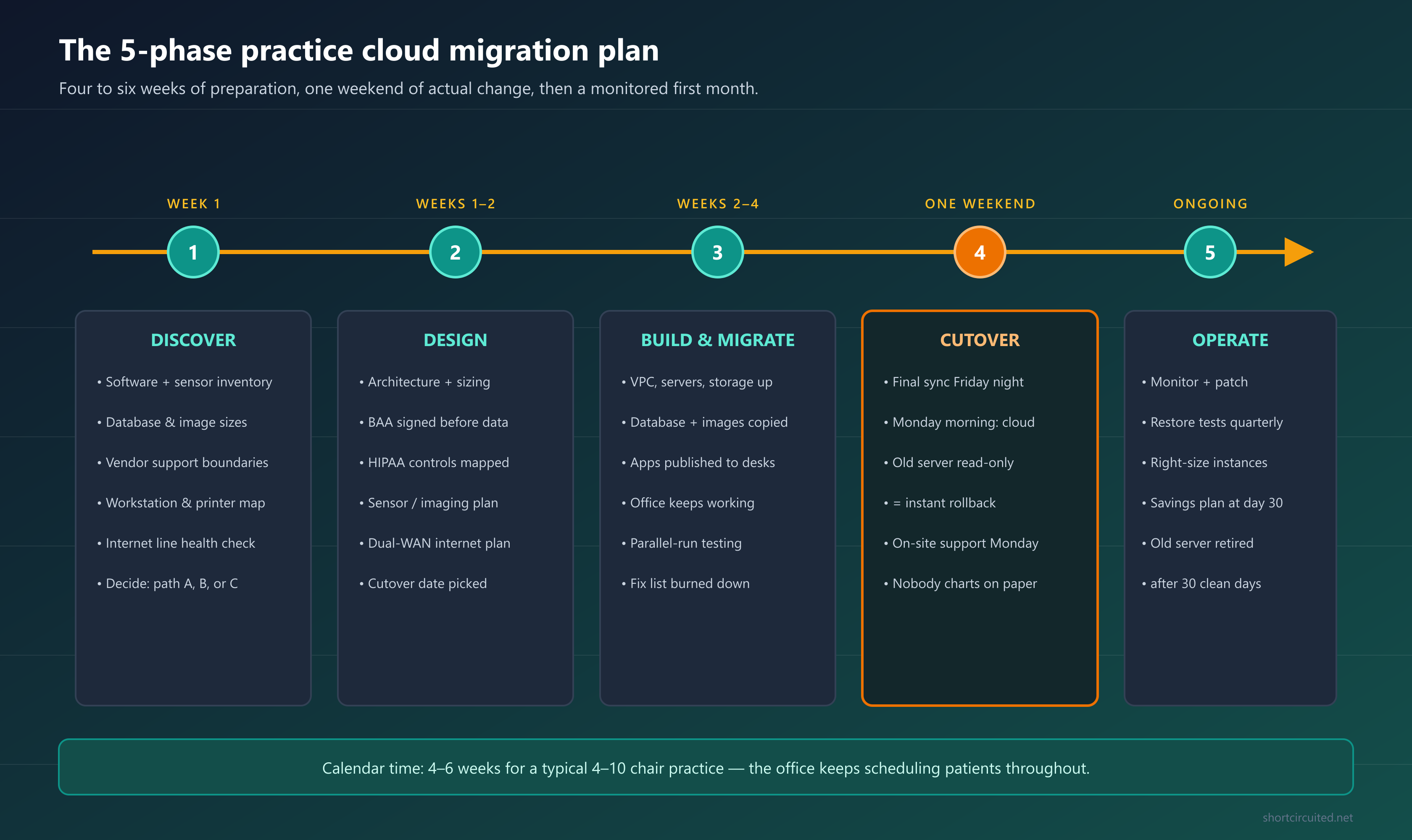
Phase 1 — Discover (Week 1)
- Inventory every piece of software, every sensor and camera, every interface (clearinghouse, labs, e-services), and the workstation each depends on.
- Size the database and the image archive, and check the health of the existing backup.
- Get each vendor’s cloud position in writing — PMS vendor, imaging vendor, clearinghouse. Some support their software on terminal servers; some only support their own hosting. This single step kills more bad plans before they start than anything else.
- Check the internet lines: speeds, reliability, and whether a second ISP is available at the address.
Phase 2 — Design (Weeks 1–2)
- Pick the path (A, B, or C) and the target architecture: region, network, server sizing, storage, backup policy, and the sensor/capture-station design.
- Sign the BAA, set up the AWS account properly (MFA, billing alarms, least-privilege access), and map the HIPAA controls to the build.
- Plan dual-WAN internet: which two carriers, on which hardware, with automatic failover.
- Pick the cutover weekend — a light schedule Monday, no month-end, no holidays.
Phase 3 — Build and Migrate (Weeks 2–4)
- Stand up the AWS environment while the office keeps working on-premises: network, terminal server, managed database, storage, backups, gateway.
- Copy the database and images (first full copy overnight, then nightly deltas, so the final copy is minutes).
- Publish the applications to workstations — staff see the same icon they see today.
- Parallel-run and test with real people from every role: schedule, chart, ledger, claims, imaging capture, printing, reports. Burn down the fix list before the date is confirmed.
Phase 4 — Cutover (One Weekend)
- Friday night: final data sync, freeze the old server read-only.
- Monday morning: the practice opens on AWS — and someone from the migration team is standing in the office.
- Rollback is a 10-minute repoint back to the old server, which stays in your back pocket for 30 days. That safety net is what makes the whole thing low-risk.
Phase 5 — Operate (Ongoing)
- First month: monitor performance daily, verify snapshots, fix paper cuts, then right-size the instances from real data.
- Day 30: review the bill, apply savings plans, schedule quarterly restore tests — and only then wipe and retire the old server.
For the software-level detail — exact AWS settings, database migration commands, the cutover runbook hour by hour — read the Open Dental → AWS migration guide; the phases are identical for any practice system.
What It Costs: Monthly and One-Time
Honest numbers, October 2026, us-east-1, on-demand pricing. “Platform” is the AWS bill; it does not include the IT labor to design, migrate, and run the thing, which is where a specialist (or a very technical owner) comes in.
| Practice size | AWS platform / month | One-time migration | Notes |
|---|---|---|---|
| Solo / 1–3 ops | $180–$300 | $2,500–$4,500 | Lean single-server build; honestly compare against vendor SaaS first |
| 4–10 chairs | $250–$450 | $4,500–$9,000 | Terminal server + managed database Multi-AZ + image storage + backups |
| Multi-location / DSO | $600–$1,500+ | $8,000–$18,000 | One cloud hub serves every location; scope depends on locations and imaging |
- One-time extras: Windows remote-desktop licenses (~$120–$180 per user) and dual-WAN hardware if you do not already have it.
- Savings plans: once stable (usually day 30), a 1- or 3-year commitment cuts the platform bill 30–40%.
- What replaces it: the next server refresh ($6k–$10k+), its installation, the backup appliance, and the emergency visits when it fails. Over five years the totals often land closer than people expect — the cloud line just stops spiking.
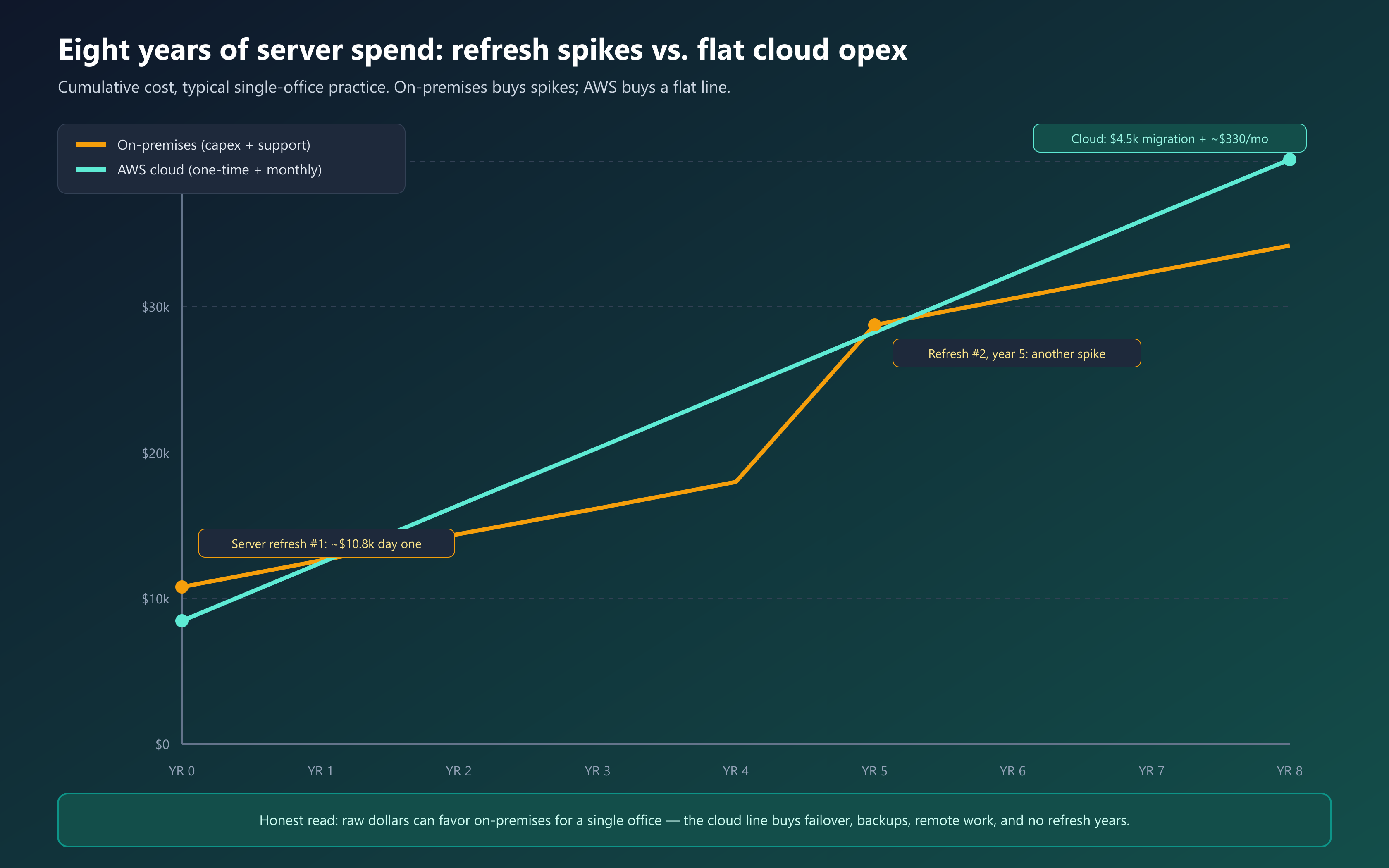
Want these numbers for your actual practice — locations, chairs, sensors, image archive and all? Our dental network cost estimator prices the full picture, and our local server vs. cloud comparison walks the decision in more depth.
Multi-Location Practices and DSOs: Where AWS Shines Hardest
The moment a practice has two addresses, the economics flip decisively toward your own cloud:
- Every location becomes “local.” One AWS hub means the satellite office gets the same speed as the flagship — no site-to-site VPN maze, no replicated database to keep in sync.
- One set of systems to secure and patch instead of one per address — the compliance surface shrinks as you grow.
- Consolidated imaging and reporting. Production, A/R, and clinical data across locations live in one place, and multi-site reports stop being a spreadsheet ritual.
- New locations open in days. Adding an office is internet lines, workstations, and sensors — the “server room” step disappears.
If you are acquiring a practice, moving the target onto your cloud before the first Monday is the cleanest integration path there is.
The Risks Nobody Puts in the Brochure
- Your internet becomes the single point of failure. A cloud practice without dual-WAN failover is one ISP outage from paper charts. Two carriers, automatic failover — non-negotiable, and it is in every design we ship.
- Sensors stay physical. Anyone promising “everything in the cloud” has never met a USB sensor. The hybrid capture design is normal; pretending otherwise causes Monday surprises.
- Vendor support boundaries. Some practice-software vendors only support their own hosting or specific configurations. Discover this in Phase 1, in writing — see our practice management support notes for how these policies differ.
- Latency kills chatty software. Desktop practice software expects LAN speed. The fix is running the app on a server beside the database and streaming the screen — never the app-over-VPN design that dooms migrations. The Open Dental AWS guide diagrams exactly why.
- The bill surprises the unprepared. An idle test instance left running, a forgotten NAT gateway, an oversized database — all avoidable with a budget alarm on day one and a day-30 right-sizing review.
- “Migrate and forget” is a myth. Servers still need patching, restores still need testing, HIPAA still needs running. The cloud changes where the work happens, not whether it needs doing — that is what managed monthly plans are for.
When You Should NOT Move to the Cloud
An honest guide has to say this part out loud. Stay on-premises (for now) if:
- Your server is healthy and under warranty, backups are tested, and you are a single location with no remote-access needs — a well-built on-premises server remains a good answer. Read the local vs. cloud comparison and decide with numbers.
- Your practice software is end-of-life and the vendor refuses to support any cloud configuration — fix the software question first.
- Your address genuinely has only one viable ISP and no LTE fallback — a cloud practice on one internet line is a bet against the weather.
- Cash flow cannot absorb the monthly platform bill right now — a used server and a strict backup routine is the responsible stopgap, not a rushed cloud move.
The cloud is a tool, not a religion. The practices that get hurt are the ones that migrate on hype and skip the assessment — in either direction.
The 10-Question Cloud-Readiness Checklist
Score your practice honestly. Six or more “yes” answers means a cloud migration will likely pay for itself within a server cycle:
- Is your server out of warranty, older than five years, or both?
- Has anyone actually restored a backup in the last quarter?
- Do owners or doctors need access from home or while traveling?
- Are you opening, acquiring, or merging a second location?
- Has your PMS/EHR vendor confirmed in writing that they support cloud or terminal-server use?
- Do you know every sensor, camera, and interface — and the workstation each is tied to?
- Is your internet reliable, and can you add a second carrier or LTE at the address?
- Is MFA in use on every system that touches patient data?
- Do you have (or can you get) BAAs for every service touching PHI?
- Can the budget absorb a predictable monthly platform line in exchange for no more refresh years?
Frequently Asked Questions
Is AWS HIPAA compliant for dental and medical practices?
AWS is HIPAA-eligible and will sign a Business Associate Agreement (BAA) covering your data — you accept it self-service through AWS Artifact before any patient data moves. But a platform being eligible is not the same as your installation being compliant: encryption, access control, auditing, and your office policies are your configuration and your responsibility. The BAA covers AWS; the compliance program is still yours (and ours, when we manage it).
How much does AWS cost per month for a dental or medical practice?
A typical single dental office runs $250–$450 per month all-in on AWS (app server, managed database, image storage, backups) on on-demand pricing. Lean solo builds start around $180–$300; multi-location groups run $600–$1,500+. One-time migration labor is separate, and 1- or 3-year savings plans cut the platform bill 30–40% once the build is stable. Windows remote-desktop licenses add roughly $120–$180 per user, one time.
How long does it take to move a practice to the cloud?
Four to six weeks of calendar time for a typical 4–10 chair practice, with one weekend of actual change. The office keeps working on the old server while the cloud build runs in parallel and gets tested; cutover is a Friday-night final sync and a Monday morning on the new system, with the old server kept read-only as an instant rollback.
Will our X-ray sensors and intraoral cameras still work?
Yes — but capture stays local. Sensors are USB devices physically tied to a chairside computer, so the standard design keeps one or two capture workstations in the office that acquire images and hand them to the cloud archive for storage and viewing. This hybrid is the norm, not a compromise. Inventory your exact sensor and imaging software models first, because a few do not cooperate with remote sessions and that decides your capture-station design.
What's the difference between our PMS vendor's cloud and our own AWS cloud?
Vendor clouds (Curve, Dentrix Ascend, cloud EHRs) mean you subscribe to their software on their infrastructure: zero servers to run, but your data lives inside their platform and your exit is an export project. Your own AWS build runs the software you already own — Open Dental, Dentrix, Eaglesoft, billing tools — on infrastructure you control under your own AWS BAA, and the data stays portable. Vendors are simpler; AWS is yours. Many practices happily pick the vendor; control, multi-location, and data-ownership needs push practices to AWS.
What happens if our internet goes down after moving to the cloud?
A cloud practice needs its internet the way the old practice needed its server — so the standard build is dual-WAN failover (two separate ISPs, ideally different technologies like fiber plus cable or LTE) so a single outage is a non-event. Compare that honestly to the on-premises status quo: a dead server also idles the office, but only someone physically on-site could fix it. Different failure, similar stakes — plan for both.
Does moving to AWS protect us from ransomware?
It materially improves your posture: no exposed remote-desktop ports, centralized patching, MFA at the front door, and point-in-time snapshots plus immutable S3 backups that let you roll back to hours before an attack. It does not make phishing emails harmless, and it does not remove your obligation to train staff and test restores. Practices that pair the move with our HIPAA security work get both halves done at once.
Can we run Dentrix or Eaglesoft on AWS, or is this only for Open Dental?
Any Windows client/server practice software can run on the same AWS pattern — a terminal server beside a managed database. We have migrated Open Dental, Eaglesoft, and Dentrix-based offices the same way; the differences are the database engine (SQL Server vs MySQL), licensing, and the support boundaries of each vendor, which we verify in writing before we build. Check the cloud policy of your vendor in Phase 1, not after cutover.
Do we still need an IT company after moving to the cloud?
Yes — less firefighting, more stewardship. Someone still has to patch the servers, manage workstations and sensors, test restores, watch the bill, run the HIPAA program (risk analysis, training, sanctions), and be accountable when something breaks at 8 a.m. on a Monday. That is exactly what our monthly dental IT plans do for cloud-hosted offices; the cloud changes where the work happens, not whether it needs doing.
Plan Your Move With a Team That Does This Weekly
We are Short Circuited — a Brooklyn-based dental and medical IT company that has kept NYC practices running since 2003. We design, build, migrate, and then manage AWS environments for healthcare offices: the HIPAA controls, the imaging integration, the cutover weekend with a human standing in your office, and the phone number that answers on Monday morning.
- Call (929) 487-3802 — a 20-minute cloud-readiness call costs nothing
- Email dental@shortcircuited.net or send a message
- Serving dental and medical offices across NYC — Brooklyn, Queens, Manhattan, the Bronx, and beyond
- Read next: the step-by-step Open Dental → AWS migration, the dental ransomware recovery playbook, or how backups should actually work