CT Scan CD to USB Transfer for Doctors & Dentists
Bring us the disc the imaging center handed your patient. We transfer every image from the CD to a portable USB drive — converted into the exact format your office software requires, verified, and usually ready the same day.
Your patient walks in holding a CD from the imaging center. The disc is supposed to contain their CT, CBCT or MRI study — but it was burned for patients, not for your practice. It autoloads a viewer the imaging center licensed, that viewer doesn't run on your operatory PCs, your implant planning software won't import the files the way they're stacked on the disc, and half the time the front desk can't even find the images under the folder structure the center used. Meanwhile the patient is in the chair and the surgeon needs those slices today.
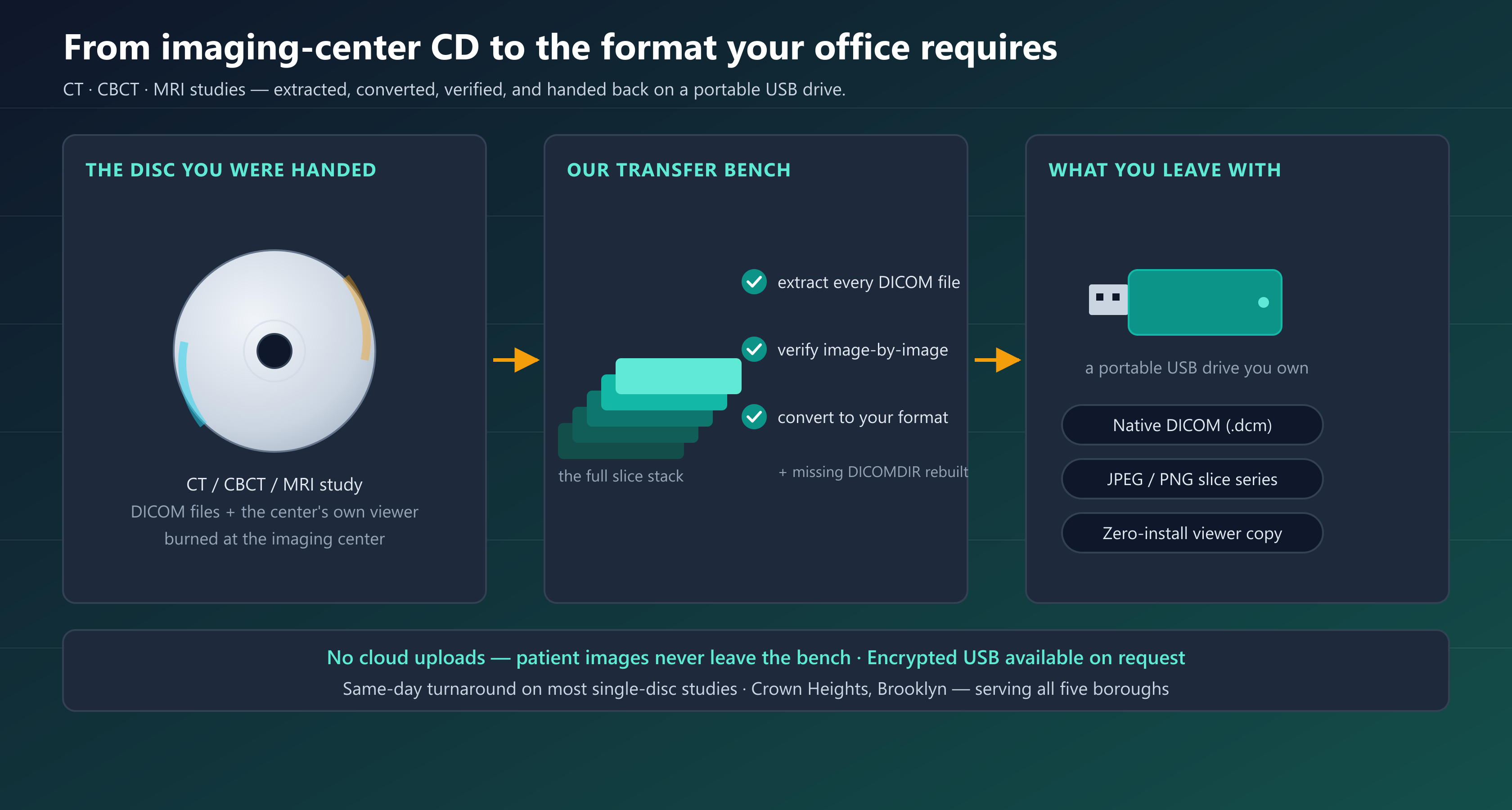
That gap — between what the imaging center hands out and what your office software actually requires — is exactly what we close. We take the CD or DVD, extract every DICOM image off it, verify the transfer image-by-image against the original study, convert the study into the format your software requires — native DICOM for planning software, JPEG/PNG slice series for consults and referrals, or a zero-install viewer copy that opens on any PC in the office — and hand it back to you on a portable USB drive. Doctors and dentists across Brooklyn, Manhattan, Queens, the Bronx and Staten Island use this service for implant planning, surgical workups, second opinions, referrals and record-keeping.
What you get
- ✓Every image extracted from the disc and verified against the original study — nothing silently dropped
- ✓Converted into the exact format your office requires — native DICOM, JPEG/PNG series, or zero-install viewer
- ✓Delivered on a portable USB drive you own — hardware-encrypted options available
- ✓Multi-disc studies merged into one organized study, structured the way planning software expects
- ✓Scratched, locked or viewer-only discs recovered on our bench
- ✓Patient images never touch the cloud — handled offline, wiped from our bench after handoff
- ✓Same-day turnaround on most single-disc studies
From imaging-center CD to the format your office requires
Imaging centers burn discs for the patient, not for your practice. The result is a CD that works in a living-room laptop and fights your office the moment it crosses the threshold. Our transfer service is built around the three things a busy practice actually needs: the images come off the disc complete, they come back in the format your software requires, and they arrive on a USB drive you own — no viewer to install, no license to buy, no portal to log into.
Tell us what the images are for — a CBCT volume for implant planning in Romexis, a sinus CT for an ENT workup, an MRI series for a referral packet — and the USB comes back structured for exactly that job.
Why imaging-center discs don’t just work in your software
If a scan disc has ever wasted an afternoon at your front desk, it was probably one of these — all of them daily work on our bench:
- Viewer-only discs.The images only open through the center's bundled viewer, which is built for home Windows PCs — not your operatory workstations, not your Mac, and definitely not your planning software.
- The files are there but the map isn't. A missing or broken
DICOMDIRmakes many programs see a disc full of useless files instead of an organized study. - Non-standard encodings. Compressed or unusual DICOM transfer syntaxes that your software technically supports but refuses in practice.
- Locked or stripped discs. Centers that encrypt, watermark or otherwise lock their media, or that burn a portal installer instead of the study.
- Physically marginal media. Cheap burned CDs and DVDs that were readable the day they left the center and degrade every month after.
None of this is exotic — it's the normal gap between how imaging centers distribute studies and how practice software consumes them. We've been closing that gap for NYC dental and medical offices since 2003.
Every format your office might require
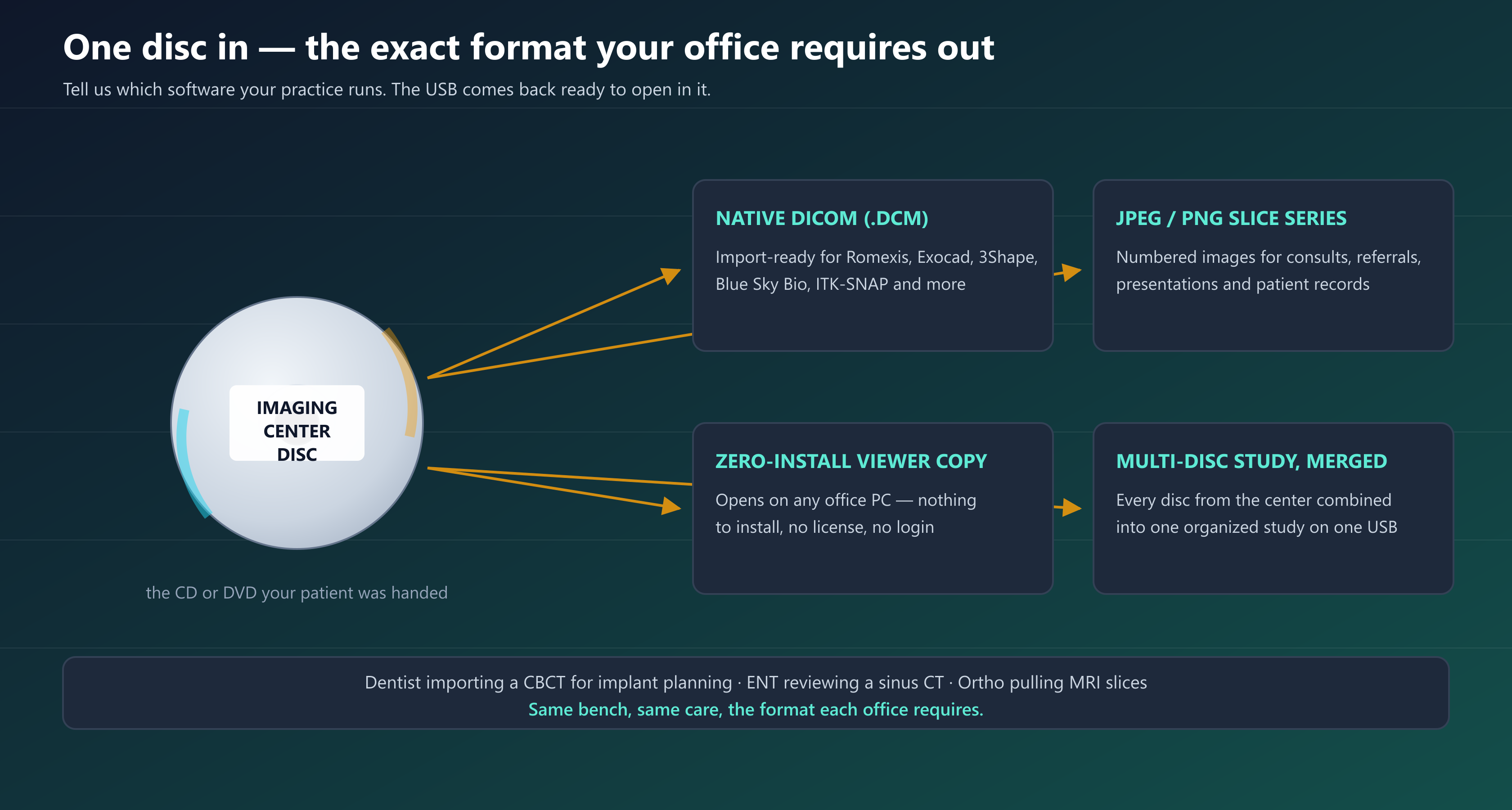
One disc in, the format your office requires out. You tell us the destination and we deliver:
- Native DICOM (uncompressed .dcm) — the format implant planning and diagnostic software expects: Romexis, Exocad, 3Shape, Blue Sky Bio, Planmeca, Carestream, ITK-SNAP, Horos and others. Delivered with the folder structure and study organization these programs actually import cleanly.
- JPEG / PNG slice series— the full study exported as numbered images for consults, treatment presentations, referrals, insurance and the patient's own records.
- Zero-install viewer copy — a self-contained viewer alongside the images that opens on any office PC with nothing to install, license or log in.
- Multi-disc studies merged — when a center splits a study across several discs, we combine them into one organized study on one USB.
How the transfer works — step by step
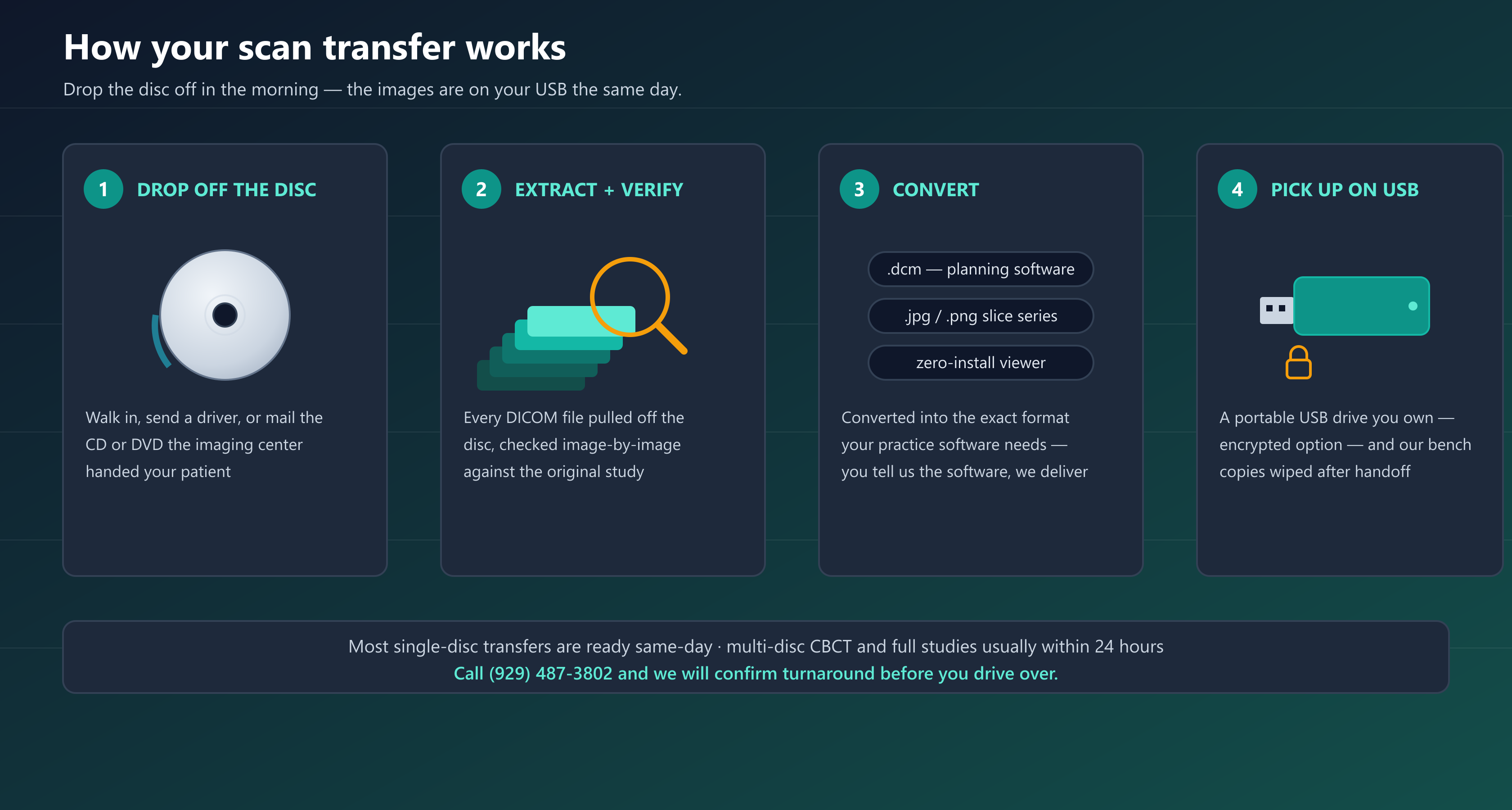
- Drop off the disc. Walk it into our Crown Heights shop, send it with a driver or a patient, or mail us the CD or DVD. Multiple discs and the original paperwork are welcome.
- We extract and verify. Every DICOM file is pulled off the disc and the transfer is checked image-by-image against the original study — slice counts match, nothing silently dropped.
- We convert to your required format. Native DICOM, JPEG/PNG series, viewer copy, or a combination — structured for the exact software you named at drop-off.
- Pick up your USB. Your study on a portable USB drive you own — encrypted option for PHI in transit — and our bench copies are wiped after handoff.
Who this service is for
Half of this work comes from dentistry, half from medicine — the disc problem is identical on both sides of the street:
- Implant dentists and oral surgeons — CBCT and CT volumes from outside imaging centers, transferred into Romexis, Exocad, 3Shape or Blue Sky Bio for planning.
- Endodontists and orthodontists — small-volume CBCT studies delivered import-ready instead of viewer-locked.
- Physicians — ENT reviewing sinus and temporal-bone CT, orthopedics pulling MRI and CT series, neurology, pain management and primary care practices that want studies in the chart instead of on a shelf of discs.
- Medical and dental offices generally — clearing a backlog of patient discs into organized, searchable USB archives.
If your office receives scans on discs and your software wants them some other way, that's the whole job description.
Handled like patient data — because it is
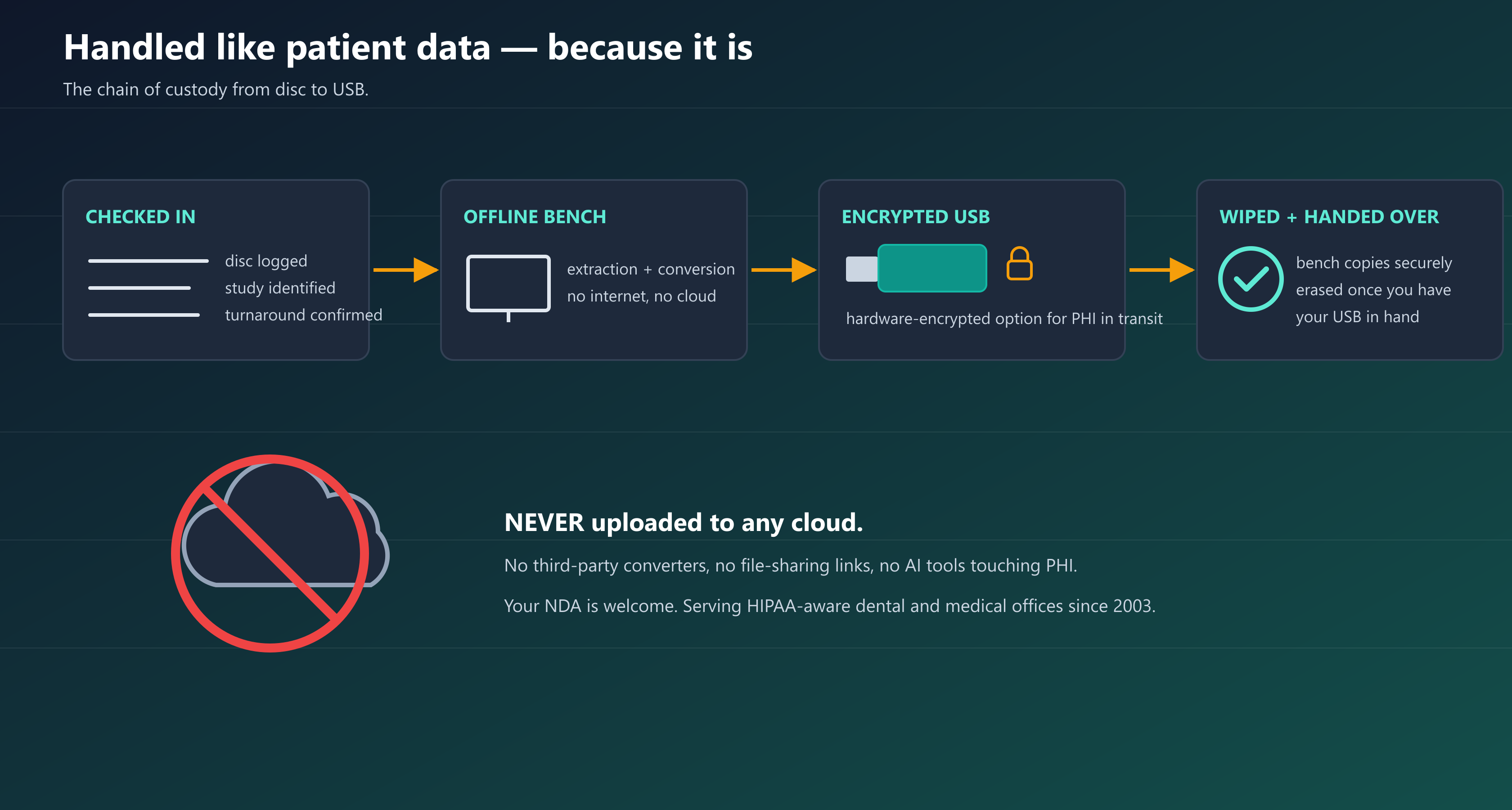
A scan disc is PHI from the moment it leaves the imaging center, and we treat it that way. Extraction and conversion happen on an offline bench workstation — no internet, no cloud, no third-party converter sites, no AI tools touching your patient's images, ever. The finished study goes onto a new USB drive you own, with hardware-encrypted drives available for PHI in transit, and our bench copies are securely wiped once the drive is in your hand.
We're the same HIPAA-aware IT shop that NYC dental and medical offices have trusted with their networks, servers and imaging systems since 2003 — happy to sign your NDA, and happy to tell you exactly how the handoff works before you hand us anything.
Scratched, locked and “empty” discs recovered on our bench
A disc that the imaging center swears has the study but that shows nothing on your PC is usually not empty — it's speaking a dialect your machine doesn't. On our bench we rebuild missing DICOMDIR indexes, decode non-standard and compressed DICOM encodings, extract studies from viewer-only discs, and read scratched or degraded media on drives chosen for exactly that job.
If the data is physically on the disc, we can almost always get it. If it truly isn't, we'll tell you that honestly — and the faster call is usually to have the imaging center re-issue the study while we handle everything downstream.
Frequently asked questions
▸Will the transferred scan import directly into my implant planning software?
In almost every case, yes. Romexis, Exocad, 3Shape, Blue Sky Bio, Planmeca, Carestream, ITK-SNAP and Horos all consume standard DICOM — the failure point is almost never the software, it's how the imaging center structured (or viewer-locked) the disc. Tell us which program and version you run when you drop the disc off and we deliver the study in the exact format and folder structure it imports cleanly.
▸How long does a CD to USB transfer take?
Most single-disc studies are ready the same day— often while you wait if you're coming from nearby. Large CBCT volumes and multi-disc studies usually finish within 24 hours. Call ahead at (929) 487-3802 and we'll confirm turnaround before you drive over.
▸Can you convert the images to JPEG or files I can use in a presentation?
Yes. We export the complete study as a numbered JPEG or PNG slice series — ideal for treatment presentations, patient consults, referrals to other providers, insurance submissions and the record. Many offices take both: native DICOM for the planning software and a JPEG series for everything else.
▸How do you protect patient privacy — is this HIPAA-aware?
Yes. The disc is PHI and is handled that way: extraction and conversion run on an offline bench workstation with no internet access, patient images are never uploaded to any cloud, third-party converter or AI tool, the finished study goes onto a USB drive you own (hardware-encrypted options available), and our bench copies are securely wiped after handoff.
We're the HIPAA-aware IT provider behind NYC dental and medical offices since 2003, and we'll sign your NDA on request.
▸The imaging center’s disc won’t open, autoplays a viewer, or looks empty. Can you still get the images?
Usually, yes. A disc that shows nothing on your PC is rarely empty — it's typically missing its DICOMDIRindex, encoded in a non-standard way, or locked to the center's bundled viewer. We rebuild indexes, decode non-standard DICOM, extract from viewer-only discs and read scratched media on recovery-grade drives. If the data genuinely isn't on the disc, we'll tell you honestly so you can have the center re-issue the study.
▸Do I need to bring my own USB drive?
No — we stock new USB drives so your study never shares media with anything else, and hardware-encrypted drivesare available if you want PHI-grade protection in transit. If you prefer to bring your own drive, that works too; we'll format it fresh before the transfer.
▸Do you work with doctors’ offices too, or only dentists?
Both. Dentists send us CBCT and CT volumes for implant planning; physicians send CT and MRI studies from ENT, orthopedics, neurology, pain management and primary care. The disc problem is identical on both sides — the imaging center hands out a disc and your software wants the study some other way — so the bench handles either without distinction.
Ready to stop fighting your tech?
We work with dental practices across NY. Most quotes in under an hour.